LAB / WEEK 10
Move Through the Model
Choose a route for an explicit objective, predict its published sensor events and compare its dependencies with an alternative.
IN PERSON (PREFERRED) · ONLINE AVAILABLE
What you will learn in this lab
Choose a route for an explicit objective, predict its published sensor events and compare its dependencies with an alternative.
Keep this evidence: sensor route. Later use: A physical final recovery needs a route suited to its load and equipment. Digital and stabilisation approaches need relevant evidence rather than compulsory token navigation.
The online environment also supports preparation and revision between classes. Campus packs specify the proposed teaching setup; physical apparatus has not been validated by this website prototype.
For online participation and revision: follow the Lab mission checklist and named controls below. Complete the practical outcome named for this week. Perform an intervention or receiving handover only when the activity requires it; other field extensions are optional. Explain and save the attempt before switching phases. Need an example first? The demonstration uses a different scenario and keeps separate practice progress.
FIELD TRAINING / 10
Move Through the Model
The Surveyed Passage. Guide the team across a published sensor grid and accurately report what its passage records.
An untested route can miss sensor contacts. The team needs an observed route and its limitations, not an unsupported promise of being unseen.
The skill you need: Choose a route objective, predict contacts, plan and execute a route that meets its conditions, and explain a trade-off.
Evidence output: sensor-route. Later use: A physical final recovery needs a route suited to its load and equipment. Digital and stabilisation approaches need relevant evidence rather than compulsory token navigation.
Learn the skill · worked example
A path that enters two marked cells has two sensor contacts, even if it later leaves coverage. A plan that predicts those contacts is better specified than one that simply labels the path “safe”.
First explain what you predict. Manipulate the apparatus, compare the observed result, then change one relevant condition. The transfer challenge changes the context so that repeating an earlier answer may fail.
Start here: read the worked example, then use the controls in Practice. The completed investigation, experiment or agreement is your practical output. The field operation is an optional narrative extension. Then try Skill check and Transfer challenge. The six rows in the lab timetable describe the whole teaching session; they are not six hidden game levels.
Scene guide · people, evidence and object placement
People and the route model
A five-by-five grid with published sensor cells.
- Your part
- The moving student avatar represents you. Inspect the scene and use the lesson controls to record and test your decisions.
- Your instructor
- Mara stands in the marked teaching bay outside the investigation area. She guides the exercise. Her presence, appearance and idle gestures are not clues about what happened in the case.
- People in this scenario
- The route marker represents the traveller being modelled. Your student avatar and Mara are not extra sensor targets.
- What counts as evidence
- Count recorded steps ending in marked sensor cells, including repeat entries. Use the phase's published sensor set.
- Why the objects are here
- The floor grid is a navigation model. Walking the student around the academy does not execute grid steps or add sensor contacts.
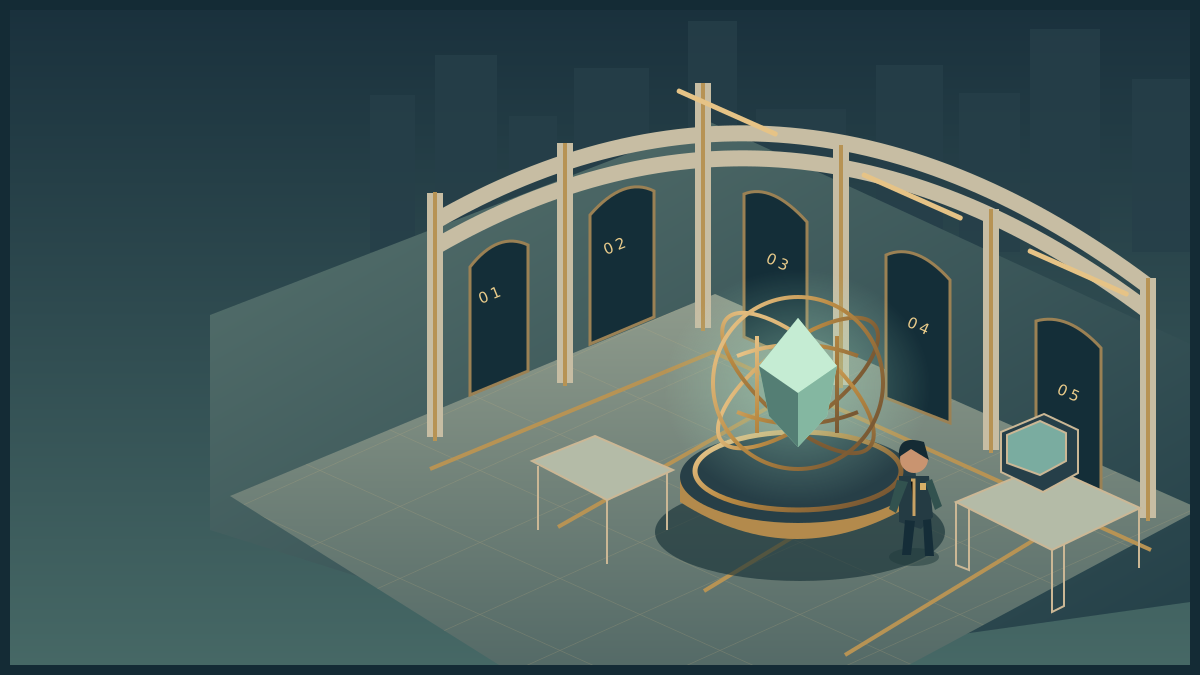
Movement Hall
Explore the room. Inspect its instruments. Discover the obstacle, use your skills and complete the operation.
Loads on request · all equipment also has accessible controls belowHow to move, inspect and complete the activity
Use WASD or arrow keys to walk. Press E near an instrument to examine it. Inspect means read its details; Use equipment performs the action named in its status message. The task controls let you choose exact settings and test a solution. Once verified, use the mission station to put it into effect, collect the resulting evidence or cargo, follow its checkpoints and complete the handover at the receiving station.
Scroll over the scene or use Zoom + / Zoom − for a closer or wider view. Click and drag to turn whenever the cursor is free. Choose Fullscreen mission to keep the scene, mission instructions and all task controls together. Fullscreen starts with a free cursor so you can scroll the panel and choose options. Press X or Lock cursor (X) to turn by moving the mouse. Press X again to free the cursor and return to click-and-drag turning. Tab also frees the cursor. The X shortcut stays inactive while typing or choosing a form value. Press Escape or Exit fullscreen to return to the page. On touchscreens, drag to look and use the zoom buttons. If your browser cannot enter native fullscreen, the mission expands to fill its window.
The activity below also works without 3D. Follow its objective and feedback, then save your record. Walking around the scene is optional and does not complete the lab by itself. The campus worksheet provides a printable alternative.
Optional field extension · act on your result
Your lab record does not require this transport and handover sequence. Use it to rehearse the result in the academy story.
FIELD OPERATION · Briefing
The Surveyed Passage
Guide the team across a published sensor grid and accurately report what its passage records. Choose fast dispatch, centre support or survey; plan for that objective across horizontal coverage.
An untested route can miss sensor contacts. The team needs an observed route and its limitations, not an unsupported promise of being unseen.
Inspect the mission station to begin your investigation.
Nothing collected.
Mission actions become available when the activity loads.
Mission record and accessible controls
These controls perform the same actions as the marked stations in the scene. Use them with a keyboard or touch, or when graphics are unavailable. Equipment tests establish whether your intervention is supported. The final handover records a mission outcome; your explanation is assessed separately.
- No mission actions yet.
LAB MISSION / Practice
What you are trying to do
Choose a route serving fast dispatch, a support visit or a sensor survey; test its dependencies and predicted contacts.
DO THIS NEXT
Select What should this route accomplish? Read its condition and the bronze sensor cells, then use Add north/east/south/west. The centre support point is row 3, column 3.
Equipment instructions for this mission
- Choose an objective and plan
Select What should this route accomplish? Read its condition and the bronze sensor cells, then use Add north/east/south/west. The centre support point is row 3, column 3.
- Predict contacts before moving
Enter Predicted sensor contacts. Count every entry into a marked cell, including repeated entries; a boundary move stays in place.
- Run one move at a time
Select Execute next step until the route is complete. Watch Current row, Current column and Sensor contacts. Rewind returns to the start.
- Compare prediction and result
Select Test this configuration. If they differ, locate the missed contact, revise your route or explanation, then rewind and rerun.
How you know you are done: Reach dispatch with a matching contact prediction and satisfy the chosen objective: eight moves, centre support or two surveyed sensors. Save the practical record and your explanation; no package delivery is required.
Inspect means select a named object and read its finding. Use the equipment means operate the labelled controls below, then check the result. Exploring the scene does not automatically complete the task.
The apparatus and the controls below use the same model. All tasks can be completed with keyboard controls. No timer is required.
The complete worksheet below is available while the interactive lab loads.
Practice in progress
Load the controls or use the worksheet to begin.
Hint 1. Mark the complete set of sensor cells before planning.
Hint 2. Predict contacts from steps ending in those cells, including revisits.
Hint 3. Compare your route with its objective: rapid arrival, centre support or deliberate sensor coverage. Rewind before replay.
After playing · explain and save this attempt
Finish the practical attempt first. Then record what you noticed, what changed and any help you used. You can also preserve an unfinished attempt.
Recording preserves your actions and explanation. Practice feedback does not award an academic grade.
Your recent action trace
- No actions recorded yet.
Complete worksheet and explanation · works without JavaScript
Mission: Guide the team across a published sensor grid and accurately report what its passage records.
Obstacle: An untested route can miss sensor contacts. The team needs an observed route and its limitations, not an unsupported promise of being unseen.
Task: Choose a route objective, predict contacts, plan and execute a route that meets its conditions, and explain a trade-off.
Optional field extension: once the equipment check passes, commit the surveyed passage record. Trace the result through Route receiver, then confirm dispatch received the route account. Expected consequence: The surveyed route reaches dispatch with its observed contact count attached.
Objective-led route planning
Draw a 5×5 grid. Start row 5, column 1; destination row 1, column 5. Practice sensors: row 3, columns 1–4. Check: column 2, rows 2–5. Transfer: column 4, rows 2–5.
Choose fast dispatch (arrive within eight moves), support (visit centre row 3, column 3) or survey (visit two different sensor cells). Predict entries into marked cells, execute the route and compare. Each entry counts, including repeats. Choose and compare a route for another objective: fewer contacts do not necessarily serve the mission better.
Reflection and example
Separate demonstration: My first gallery route made one contact; the alternative made zero under the same sensor set. The changed coverage made the alternative record three. I preserved each route and count with its governing map before choosing by the stated objective.
Your output: sensor-route. Record the conditions, actions, result and what you would test next. An explanation can be defensible while differing from the example.
YOUR SKILLS PASSPORT
Keep what you learn.
Practice stays in this browser. Export it to take your work with you.
Which save or export should I use?
- Record attempt in skills passport on a lab keeps that phase's actions and your explanation. Save it before switching to a different phase.
- Export backup JSON downloads a backup you can bring back with Restore backup.
- Export learning record creates a readable account for your portfolio. Print record prepares the same kind of evidence for printing.
- Export assessment record inside a mission keeps that trial's decisions and debrief. Keep your written assessment explanation with it.
These controls keep your work; they do not submit it to an institution. Export a backup before changing browser, clearing browser data or resetting the passport.
Preparing your saved progress…
Your mission, in plain language
Your task: Plan a journey for its purpose: fast dispatch, support through a checkpoint or deliberate sampling of instrumented cells.
What you will produce: Keep the objective, two routes with costs and dependencies, prediction before movement, actual trace and reason for selecting one.
Start here: in-person attendance is preferred. Read the briefing and In-person lab instructions. If you cannot attend, use the Online lab with the same learning record. The 3D environment also supports preparation and revision.
Before you arrive
Read SN-01 and classify five sample cells as observed/unobserved with reasons (20 minutes). Write which criterion your first route will prioritise.
Read the briefing. All starting rules and data are supplied here, so you can begin directly even if you missed an earlier lab. For the preferred in-person route, read the campus pack. The online route is available when you cannot attend. Both assess the outcomes below.
What you will learn
- Compare routes against an explicit objective and its distinct conditions.
- Predict a step-by-step contact trace using the cell-entry rule.
- Revise route or prediction after a changed map and defend the trade-off.
Supplied case file and rules
Where to find the named materials: These labels identify the supplied material on this page and in the combined campus pack; they are not separate files you need to locate. SN-01 is the numbered grid, start, destination and cell-entry contact rule. SN-02 supplies the published sensor layout for each phase; record which layout governs each route and trace.
- A 5×5 grid uses rows 1–5 from north to south and columns 1–5 from west to east.
- Start: row 5, column 1. Destination: row 1, column 5. Each action moves one cell north, south, east or west; boundaries prevent leaving the grid.
- Practice sensor cells: row 3, columns 1–4.
- Skill-check sensor cells: column 2, rows 2–5. Transfer: column 4, rows 2–5.
- A contact is counted on each executed step ending in a sensor cell, including revisits. Predict the total before stepping through the route.
- Contacts are explicit game events, not automatic failure. Reach the destination and reconcile the predicted and observed counts.
- These are published board-game detection rules, not specifications for real surveillance.
- Select an objective before planning: Fast dispatch reaches the goal within eight moves; Support visits centre row 3, column 3 before the goal; Survey visits at least two distinct sensor cells before the goal.
- All objectives need a correct predicted contact count. Zero contacts are not automatically best.
From example to independent challenge
Worked example: use the alternate scenario to learn the method. Its completed decisions cannot be copied into your assigned case.
Practice: use prompts and hints, recording help. Make the prediction or choice before checking.
Skill check: begin from the objective and evidence. Decide which test or action matters before consulting the optional explanation.
Transfer: inspect the changed condition. Decide what it invalidates and what remains supported; a justified unchanged decision can be correct.
The two-hour lab
These are the teaching session’s time blocks, not six compulsory game objectives. Adjust timing as needed; reasoning matters more than speed.
| Time | Activity |
|---|---|
| 0–10 minutes | Compare dispatch, support and survey objectives and why their routes differ. |
| 10–30 minutes | Inspect the alternate route example and locate contacts step by step. |
| 30–60 minutes | Choose an objective and compare two routes by moves, checkpoints and contacts. |
| 60–80 minutes | Execute the selection and find the first mismatch; test the second layout independently. |
| 80–105 minutes | Apply changed coverage and decide whether route, prediction or both must change. |
| 105–120 minutes | Keep both routes, maps, trace and an objective-based justification. |
In-person lab · preferred route
Printable circuit and grid sheet. Print at 100% on A4; each sheet includes a 50 mm scale check.
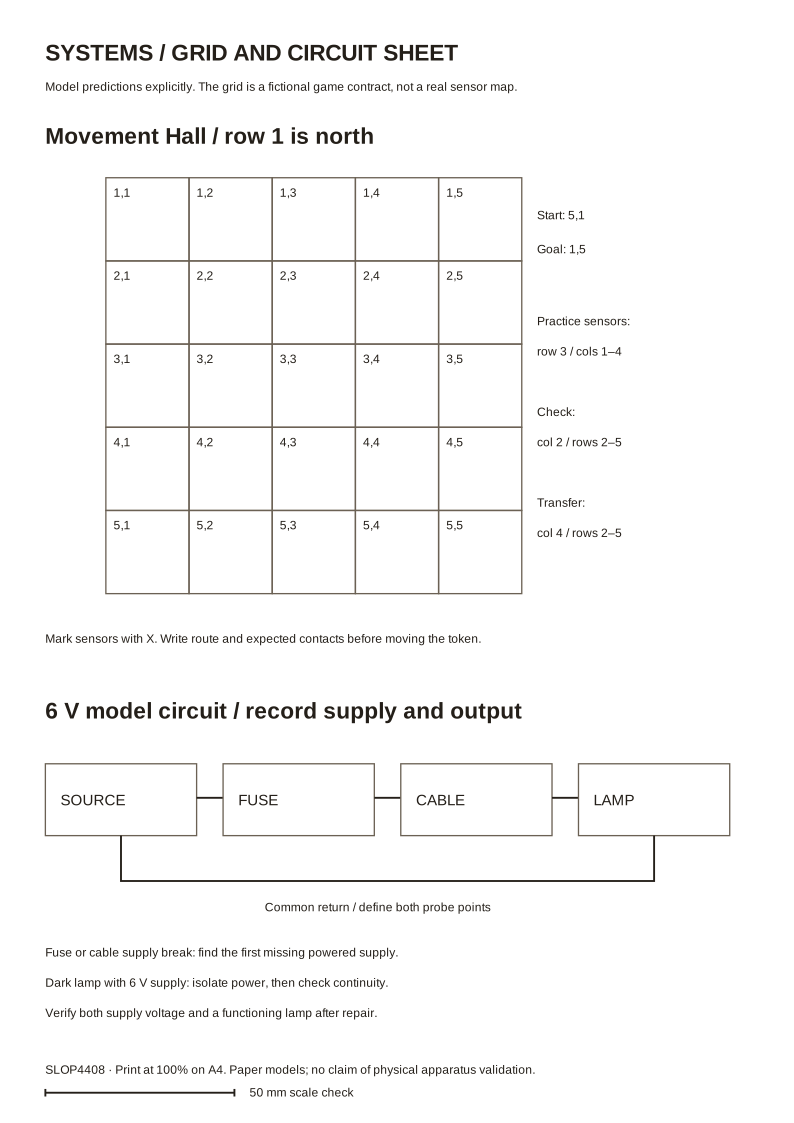
Equipment: A 5×5 printed grid, a player counter, four sensor markers, route arrows and a prediction sheet.
Setup: Draw a 5×5 grid, mark start and destination, and highlight the published sensor cells for the chosen phase. Keep all cells and rules visible.
What you do together: Choose fast dispatch, centre support or sensor survey. Compare two routes, predict contacts and execute the chosen path; revise the route or prediction under changed coverage.
The printable facilitator pack includes rules, prompts and explanation. Campus apparatus is a proposed teaching design; physical construction and handling have not been validated by browser tests. Use the paper model when equipment is unavailable.
Keep the same prediction, changed-condition attempt and explanation as the online route. A dated observation, test, agreement or route sheet serves as the action record. Add acknowledgement where a handoff is part of the task; an additional browser run is not required.
Online lab · equivalent participation and revision
Do these actions in order
- Choose the phase, inspect its sensor map and use What should this route accomplish? to select fast dispatch, support via the centre or survey.
- Compare two candidate paths on paper or in notes. Record moves, required stops and predicted contacts; use the selected objective to justify a choice.
- Use Add north/east/south/west to enter the chosen route. Predict total contacts before selecting Execute next step. Every executed entry to a marked cell counts, including revisits.
- At the destination, select Test this configuration. Check the objective conditions as well as the contact count; find the first mismatch if prediction fails.
- Save the trace. Use Rewind before replaying so position and count restart. The field extension is optional.
- Repeat under the changed layouts. Try a contrasting objective and explain why a route with more contacts might better serve it.
Optional field extension
Your investigation, experiment, agreement or revision is already the practical output. You may also stage its consequence in the scene; this extension is not required for the learning record. In Field operation, first Inspect mission station. Once your skill check is verified, select Commit the surveyed passage record. The scene and mission record now show the consequence: The surveyed route reaches dispatch with its observed contact count attached.
Collect the named result or record, follow the checkpoint controls in order (or visit the marked stations in the scene), and select Confirm dispatch received the route account at the receiver. The optional extension displays Mission accomplished after that acknowledgement; your learning record does not require it. Keyboard and touch controls perform the same actions. If you change the underlying model, the dependent intervention must be verified again.
Keep any field-extension actions separate from the evidence supporting your practical decision. Neither its completion nor its absence determines an academic grade.
Finish and keep your work
After each practical phase, open After playing · explain and save this attempt, write a brief reflection and select Record attempt in skills passport before switching phases. Keep the attempts and changed-condition evidence you discuss; an unfinished attempt can still be useful if you explain its limit. Export a backup using the passport tools.
For an uninterrupted view, choose Fullscreen mission. The Mission & controls panel contains the task and lesson controls. Scroll over the scene to zoom, click and drag to turn with the cursor free. Press X to lock the cursor for mouse-look; press X again (or Tab) to free it for scrolling and choosing options. Esc or Exit fullscreen returns to the page. Touch and keyboard controls remain available.
What leaves the room
sensor-route
Keep the objective, two routes with costs and dependencies, prediction before movement, actual trace and reason for selecting one.
Include scenario and assistance. Preserve a failed attempt if it explains a useful revision. Add approximately 100 words connecting result to decision.
A physical final recovery needs a route suited to its load and equipment. Digital and stabilisation approaches need relevant evidence rather than compulsory token navigation.
Feedback and explanation
Optional explanation and separate exemplar · open after an attempt
Check objective, destination and predicted trace together. Dispatch, centre support and deliberate survey have different conditions. An extra contact can be justified, while a zero-contact route missing its required checkpoint fails its purpose.
Worked reflection from the separate demonstration: My first gallery route made one contact; the alternative made zero under the same sensor set. The changed coverage made the alternative record three. I preserved each route and count with its governing map before choosing by the stated objective.
Inspect this example’s complete record. Use your own assigned scenario and observations for your reflection.
How to judge the response
A strong response makes a decision the instructions did not supply, supports it with evidence and explains an alternative or limit. A model check establishes its published conditions only; a facilitator judges reasoning. Text length and game endings are not academic grades.
Keep the objective, two routes with costs and dependencies, prediction before movement, actual trace and reason for selecting one.
Closing reflection
Which rule did your first mental model leave out?
Afterwards
Export your record and keep a backup. It contributes to Weekly Fieldwork, with the best ten of twelve counting. Continue to the assessment brief and consult policies for access, collaboration and extensions. Exporting does not submit coursework.
SLOP UNIVERSITY · THE ACADEMY OF IMPOSSIBLE SKILLS
An original fictional course. Progress records practice, not academic certification.