THE FINAL MISSION / MERIDIAN
Recover the impossible.
Operation Last Light. Four roles, six areas and the last intact research archive at Meridian Station.
IN PERSON (PREFERRED) · ONLINE AVAILABLE
What this assessment develops
Select relevant capabilities, coordinate their dependencies and justify omitted checks. Preserve a revised plan and defend the outcome and remaining obligations with semester evidence.
The online environment also supports preparation and revision between classes. Campus packs specify the proposed teaching setup; physical apparatus has not been validated by this website prototype.
Online final mission: Operation Last Light.
Recover Meridian Station's archive using the skills from all twelve weeks. The demonstration below, Operation Lamplight, is a different worked example. Your playable Last Light trial begins beneath it.
- Start or resume. For a first rehearsal, choose Baseline, select Start new trial and confirm if prompted. Then choose the Declared recovery objective before selecting a role or operating equipment. Saved work resumes automatically with its initial objective locked; start a new trial to choose a different objective.
- Preserve the plan and a revision. Before practical checks, the Coordinator records Version 1 at Dispatch. Return later to record an explained revision, keeping the original.
- Choose the relevant checks. Read the current source and custody conditions, then investigate the dependencies of your selected objective. Physical recovery needs support and transport; digital recovery needs transmission authority, power and receipt; stabilisation needs continuing support and a monitoring handover. The journal gives optional control help; choose your investigation order and justify omitted checks. Solo practice lets you switch roles; teams share one browser and rotate control.
- Finish and keep the record. Complete your objective’s required conditions, perform the selected intervention and receiving handover, then record the evidence for physical custody, digital receipt or stable handover at Dispatch. Resolve that outcome, read the debrief and export. Write the team explanation after playing.
Read the full final-project steps and submission checklist →
PLAYABLE FINAL MISSION
Operation Last Light
The last intact research archive is inside Meridian Station. Recover it without losing what makes it worth recovering.
Your operation: inspect the mission console to discover the problem. Explore the labelled areas, use their equipment and test your reasoning. A verified solution changes what the field console can do. Then perform the release, transmission or support handover and finish at the receiving point. Walk or tap the floor in 3D; the equivalent field buttons work with keyboard and touch. Keep full screen open throughout.
Scene guide · people, evidence and object placement
Who belongs to Operation Last Light
Meridian Station, represented through six linked mission zones.
- Your part
- You control the student avatar. The selected crew role determines your available responsibilities and tools; changing roles does not introduce another person into the room.
- Your instructor
- Mara stands in the marked teaching bay outside the investigation area. She guides the exercise. Her presence, appearance and idle gestures are not clues about what happened in the case.
- People in this scenario
- Your team takes Observer / Navigator, Systems Specialist, Investigator and Coordinator responsibilities. Solo practice uses the same student avatar while switching roles. Mara is a teaching guide outside the recovery team.
- The station custodian speaks through the handling conditions and agreement response. The handover recipient is the person you explicitly name. Neither is identified by Mara's model or an unlabelled character.
- What counts as evidence
- Use inventory, measurements, archive and policy records, the custodian's conditions, confirmed handoff, route tests and preserved plan versions.
- Why the objects are here
- Arrival details depict the inspection site. Cutaway equipment, route diagrams and plan boards are labelled mission models; they are not miniature clues to interpret outside their stated rules.
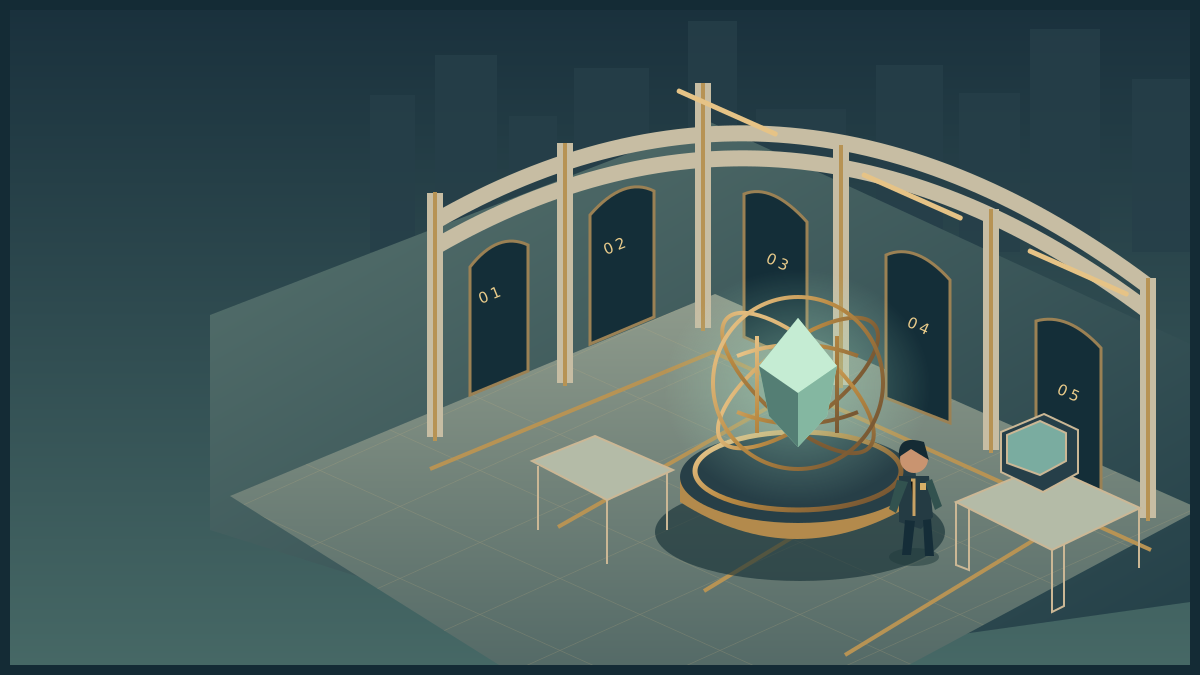
Meridian Station
Explore the room. Inspect its instruments. Discover the obstacle, use your skills and complete the operation.
Loads on request · all equipment also has accessible controls belowHow to move, inspect and complete the activity
Use WASD or arrow keys to walk. Press E near an instrument to examine it. Inspect means read its details; Use equipment performs the action named in its status message. The task controls let you choose exact settings and test a solution. Once verified, use the mission station to put it into effect, collect the resulting evidence or cargo, follow its checkpoints and complete the handover at the receiving station.
Scroll over the scene or use Zoom + / Zoom − for a closer or wider view. Click and drag to turn whenever the cursor is free. Choose Fullscreen mission to keep the scene, mission instructions and all task controls together. Fullscreen starts with a free cursor so you can scroll the panel and choose options. Press X or Lock cursor (X) to turn by moving the mouse. Press X again to free the cursor and return to click-and-drag turning. Tab also frees the cursor. The X shortcut stays inactive while typing or choosing a form value. Press Escape or Exit fullscreen to return to the page. On touchscreens, drag to look and use the zoom buttons. If your browser cannot enter native fullscreen, the mission expands to fill its window.
The activity below also works without 3D. Follow its objective and feedback, then save your record. Walking around the scene is optional and does not complete the lab by itself. The campus worksheet provides a printable alternative.
FINAL PROJECT / PRACTICAL TRIAL
Your mission
Coordinate the four roles to recover Meridian’s archive. Preserve a first plan, complete the objective’s relevant practical objectives, revise your plan, then record evidence for your chosen resolution at Dispatch. The chosen objective determines which equipment is relevant. Justify omitted checks and a credible alternative; each ending needs its own receipt, custody or monitoring record.
The trial is ready to play. Your actions save locally as you go. Solo practice allows role switching; pairs and teams can share a screen and rotate control.
AVAILABLE CHECK / OPTIONAL GUIDANCE
Inspect the mission console
The original is still on its support cradle. A checked plan does not move it or establish a safe handover. Inspect it before beginning the equipment work.
Done when the mission console records your inspection and reveals the equipment needed.
FIELD OPERATION · Briefing
Extract the original
Bring the verified archive through the tested upper route into the agreed recipient's custody.
The original is still on its support cradle. A checked plan does not move it or establish a safe handover.
Inspect the mission station to begin your investigation.
Nothing collected.
Mission actions become available when the activity loads.
Mission record and accessible controls
These controls perform the same actions as the marked stations in the scene. Use them with a keyboard or touch, or when graphics are unavailable. Equipment tests establish whether your intervention is supported. The final handover records a mission outcome; your explanation is assessed separately.
- No mission actions yet.
Observer / Navigator briefing
Establish inventory and identity from arrival records. Use notes or a memory cue as appropriate. Transport requires the map orientation and a viable route; stationary outcomes do not. Upper and Lift share the lift supply. Audit whether the team has justified the scope of its checks.
Read all role packsRoom controls and feedback
Your saved mission is loading. The instructions and role packs are available below.
Use Observer / Navigator for all three tasks in this room.
OBSERVATION · MEMORY · SPATIAL REASONING
The room is your first instrument.
Inspect the inventory and source records needed for your claim. Notes remain available. Recall is optional; explain when it helps and when a written record is more dependable. Transport planning needs the map; stationary outcomes do not.
Use Systems Specialist to change gears, release the brake and turn the crank.
MECHANICAL DIAGNOSIS
The recovery cradle.
A twelve-tooth driver must produce the output required by the verified archive profile. Use output = driver teeth ÷ follower teeth. Diagnose the holding and gearing conditions independently; this apparatus is needed for physical transport or continuing support.
Verify the archive profile in the Control room before testing the final cradle.
Use Systems Specialist. Measure the original fault before replacing it.
ELECTRONICS · MEASUREMENT
A complete path.
The training supply is 6 V. Power flows through the fuse, switch, lamp and return. Find the break before replacing anything.
Use Investigator for the archive comparison and permission repair.
DIGITAL INVESTIGATION · PERMISSIONS
Which copy can you justify?
Fictional application: permission defect
Observer/read is allowed. Technician/service is allowed. Registrar/certify is allowed. Compare that mandate with the installed entries: observer/read ALLOW; observer/certify ALLOW; technician/service ALLOW; registrar/certify ALLOW. Derive which change is justified.
Use Coordinator for agreement and handoff; switch to Observer / Navigator for the route.
COMMUNICATION · NEGOTIATION · NAVIGATION
An agreement that can be acted on.
“Preserve the original. Tell me who receives the archive. Then we can agree a recovery.”— Meridian custodian
Route model
Upper and lift routes depend on the lift supply. The service passage is independent and includes two marked sensor pauses. Consult the scenario bulletin before committing.
Your original plan and revisions
Use Coordinator to preserve your plan versions. Any role can finish once the required objectives are met.
PLANNING · ADAPTATION · DEFENCE
Keep the decisions, including the ones you changed.
Record an original plan before your revision. A revision should explain a new observation, a tested assumption or a changed condition. Earlier versions remain intact. A changed approach requires a new version; name why its checks are needed, which can be omitted and what remains unresolved.
Evidence for your chosen ending
Complete the conditions required by your chosen objective, perform your selected field operation and then record the outcome you actually achieved. These checks confirm the record is present and matches the model; your written defence explains its quality.
No outcome evidence recorded yet.
File the completed recovery
These buttons record a completed operation; they cannot perform it for you. Finish the field handover first. No ending is an academic grade.
AFTER ACTION
Export this run and complete a contrasting rehearsal. Assemble the two rehearsal records, final run, plan history, role agreement, 800–1,200-word team account, presentation and individual defences listed in the final brief.
Continue to the Week 12 after-action account. Your run stays saved; opening another page leaves full screen.
Now explain your observations and decisions using the exported action record. Compare a different scenario: which skill transferred, which assumption changed, and what remains uncertain?
Action record and previous runs
Four roles. One shared operation.
Use one browser, share a screen or rotate control. Solo students switch roles. Local role selections record practice responsibility, not verified identity.
Observer / Navigator
Establish inventory and identity from arrival records. Use notes or a memory cue as appropriate. Transport requires the map orientation and a viable route; stationary outcomes do not. Upper and Lift share the lift supply. Audit whether the team has justified the scope of its checks.
Scene inventory · Route overlay · Orientation board
Systems Specialist
Read the verified profile output requirement and use the tooth-ratio model to choose a support configuration when needed. Identify why a mechanism fails to move before changing it. The compact 6 V model supplies one combined source-and-fuse test. Retain it before replacement and verify the load; cite Lab 5 for independent diagnostic-test selection. Digital transmission needs power but no transport cradle.
Cutaway mechanism · Voltmeter · Service diagram
Investigator
Verify completeness, identity and current authority. Profile A needs one-third support output; B needs one-quarter. Give the team the evidence relevant to its objective. For transmission, derive permitted actions from the mandate and compare them with installed entries.
Replica records · Signed source · Permission test
Coordinator
Preserve the original plan, agree custody and name the recipient. Justify necessary tests and omissions. Request the current profile and relevant equipment evidence before composing a handoff. A changed approach needs a new preserved plan revision. Record the performed consequence and remaining obligation.
Custodian council · Handoff composer · Plan versions
Static mission worksheet and governing rules
Use the assessment’s campus pack for a complete paper route. Record your objective, inspect the supplied inventory, compare sources and predict the result of each test before acting. Keep observations separate from interpretations. Notes are permitted; memorisation is optional.
The workshop’s driver has twelve teeth. Output turns = driver teeth ÷ follower teeth × input turns, with the opposite direction. The holding brake blocks motion. The series supply connects source, fuse, switch, load and return; measurements distinguish a broken path from a mistaken equipment assumption. Isolate the supply before replacement.
A complete archive must match the current signed source. A later timestamp does not establish authority. The handling mandate requires preservation of the original and a named responsible recipient. The permission mandate permits observer/read, technician/service and registrar/certify; compare installed entries against it. The receiving desk accepts a verified archive at Dispatch after its integrity check.
Profile A requires one-third output; profile B requires one-quarter output. Identify the current source before choosing any dependent support configuration. Physical recovery needs a viable transport route: Upper and Lift depend on the lift supply; Service is independent. The equipment-failure bulletin disables Upper and Lift.
Digital recovery needs transmission power and permission plus a matching receipt; the original stays in place. Stabilisation needs a tested support and continuous power, a stability indicator, named custodian and monitoring plan. Neither requires transporting the original. Publish the same role records and observations on paper; a facilitator reveals the selected test’s authored result, not a suggested repair.
Before filing an outcome, perform its release, transmission or support action and handover. Retain the action record, initial/revised plan, scope rationale and limitations. No ending supplies an academic grade.
YOUR SKILLS PASSPORT
Keep what you learn.
Practice stays in this browser. Export it to take your work with you.
Which save or export should I use?
- Record attempt in skills passport on a lab keeps that phase's actions and your explanation. Save it before switching to a different phase.
- Export backup JSON downloads a backup you can bring back with Restore backup.
- Export learning record creates a readable account for your portfolio. Print record prepares the same kind of evidence for printing.
- Export assessment record inside a mission keeps that trial's decisions and debrief. Keep your written assessment explanation with it.
These controls keep your work; they do not submit it to an institution. Export a backup before changing browser, clearing browser data or resetting the passport.
Preparing your saved progress…
SLOP UNIVERSITY · THE ACADEMY OF IMPOSSIBLE SKILLS
An original fictional course. Progress records practice, not academic certification.