LAB / WEEK 01
Read the Room
Distinguish visible facts, reported claims and explanations, then choose an inspection that tests a proposed explanation.
IN PERSON (PREFERRED) · ONLINE AVAILABLE
What you will learn in this lab
Distinguish visible facts, reported claims and explanations, then choose an inspection that tests a proposed explanation.
Keep this evidence: observation record. Later use: A1 uses this method to choose which workshop condition needs investigation. The final project uses it to keep an arrival impression from becoming an unsupported operating assumption.
The online environment also supports preparation and revision between classes. Campus packs specify the proposed teaching setup; physical apparatus has not been validated by this website prototype.
For online participation and revision: follow the Lab mission checklist and named controls below. Complete the practical outcome named for this week. Perform an intervention or receiving handover only when the activity requires it; other field extensions are optional. Explain and save the attempt before switching phases. Need an example first? The demonstration uses a different scenario and keeps separate practice progress.
FIELD TRAINING / 01
Read the Room
Silent Gallery. Give Control a reliable account of the gallery before its recovery team enters.
An urgent message says the room was abandoned. Its objects establish conditions, but not who left or why. An unsupported report sends the team after the wrong lead.
The skill you need: Inspect four scene objects, classify five statements, then choose a follow-up investigation and a conclusion supported by its result.
Evidence output: observation-record. Later use: A1 uses this method to choose which workshop condition needs investigation. The final project uses it to keep an arrival impression from becoming an unsupported operating assumption.
Learn the skill · worked example
“The door is open” reports a visible condition. “Someone escaped through it” proposes a cause. The second needs evidence beyond the first. A note saying someone left is a claim, even though the note itself is visible.
First explain what you predict. Manipulate the apparatus, compare the observed result, then change one relevant condition. The transfer challenge changes the context so that repeating an earlier answer may fail.
Start here: read the worked example, then use the controls in Practice. The completed investigation, experiment or agreement is your practical output. The field operation is an optional narrative extension. Then try Skill check and Transfer challenge. The six rows in the lab timetable describe the whole teaching session; they are not six hidden game levels.
Scene guide · people, evidence and object placement
Who and what belongs to this scene
Three observation scenes: Practice, Skill check and Transfer challenge.
- Your part
- The moving student avatar represents you. Inspect the scene and use the lesson controls to record and test your decisions.
- Your instructor
- Mara stands in the marked teaching bay outside the investigation area. She guides the exercise. Her presence, appearance and idle gestures are not clues about what happened in the case.
- People in this scenario
- The owner mentioned in the Practice explanation is not shown. The Transfer operator is a source in a written report, not Dr Mara Voss.
- What counts as evidence
- Inspect the clock or display, cup or flask, door or service hatch, and written account. Classify the message asserted by a note as a claim; seeing that the note exists is an observation.
- Why the objects are here
- The clock, door and service hatch belong to the room. The cup and ledger belong on the desk; the Skill check cup belongs on its shelf. Compare each phase using its supplied scene record.
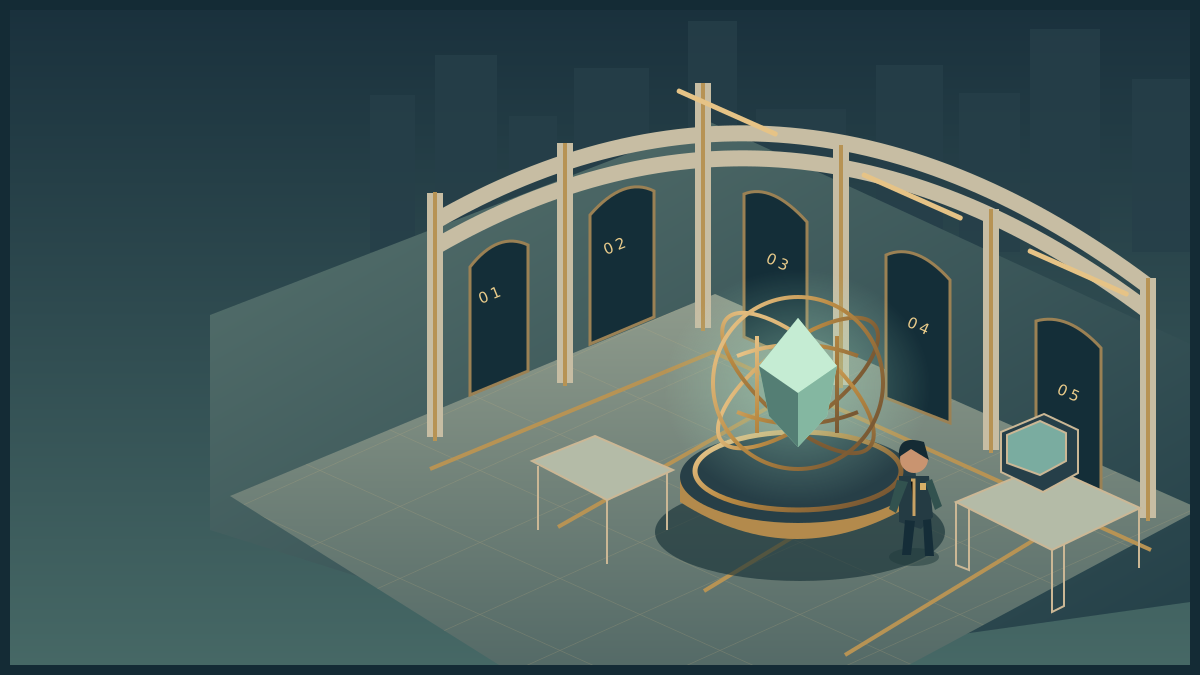
Perception Gallery
Explore the room. Inspect its instruments. Discover the obstacle, use your skills and complete the operation.
Loads on request · all equipment also has accessible controls belowHow to move, inspect and complete the activity
Use WASD or arrow keys to walk. Press E near an instrument to examine it. Inspect means read its details; Use equipment performs the action named in its status message. The task controls let you choose exact settings and test a solution. Once verified, use the mission station to put it into effect, collect the resulting evidence or cargo, follow its checkpoints and complete the handover at the receiving station.
Scroll over the scene or use Zoom + / Zoom − for a closer or wider view. Click and drag to turn whenever the cursor is free. Choose Fullscreen mission to keep the scene, mission instructions and all task controls together. Fullscreen starts with a free cursor so you can scroll the panel and choose options. Press X or Lock cursor (X) to turn by moving the mouse. Press X again to free the cursor and return to click-and-drag turning. Tab also frees the cursor. The X shortcut stays inactive while typing or choosing a form value. Press Escape or Exit fullscreen to return to the page. On touchscreens, drag to look and use the zoom buttons. If your browser cannot enter native fullscreen, the mission expands to fill its window.
The activity below also works without 3D. Follow its objective and feedback, then save your record. Walking around the scene is optional and does not complete the lab by itself. The campus worksheet provides a printable alternative.
Optional field extension · act on your result
Your lab record does not require this transport and handover sequence. Use it to rehearse the result in the academy story.
FIELD OPERATION · Briefing
Silent Gallery
Give Control a reliable account of the gallery before its recovery team enters. Inspect the 08:20 gallery and identify which statements support an entry briefing.
An urgent message says the room was abandoned. Its objects establish conditions, but not who left or why. An unsupported report sends the team after the wrong lead.
Inspect the mission station to begin your investigation.
Nothing collected.
Mission actions become available when the activity loads.
Mission record and accessible controls
These controls perform the same actions as the marked stations in the scene. Use them with a keyboard or touch, or when graphics are unavailable. Equipment tests establish whether your intervention is supported. The final handover records a mission outcome; your explanation is assessed separately.
- No mission actions yet.
LAB MISSION / Practice
What you are trying to do
Distinguish what you observed, what somebody asserted and what you inferred; then choose a useful test of an explanation.
DO THIS NEXT
Select Inspect clock, cup, door and note. Read the findings; the instructor is not a person from the case.
Equipment instructions for this mission
- Inspect the scene
Select Inspect clock, cup, door and note. Read the findings; the instructor is not a person from the case.
- Distinguish the statements
Classify the five sentences as visible observation, reported claim or inferred explanation. The note’s content is a claim even though the paper is visible.
- Investigate a competing explanation
Read the question under Test an explanation. Choose a follow-up investigation, then Run selected investigation. Select a conclusion that fits its result without inventing a cause.
- Check and preserve the account
Select Test this configuration. Correct unsupported categories or conclusions, then explain the remaining uncertainty and save the practical record. The field extension is optional.
How you know you are done: Inspect four objects, classify five statements, run a discriminating follow-up and record a conclusion bounded by the new evidence. Recall is optional. Save the practical record and your explanation; no package delivery is required.
Observation, claim and inference — in plain words
- Observation
- A detail you directly see or measure: “The door is open.”
- Claim
- Something a person or document tells you: “I left first.” It may be true, but the statement alone does not verify it.
- Inference
- An explanation you draw from evidence: “Someone left in a hurry.” An open door alone does not establish that explanation.
For the note, classify the message it asserts. Seeing that a note exists is an observation; believing its message is a separate question.
Inspect means select a named object and read its finding. Use the equipment means operate the labelled controls below, then check the result. Exploring the scene does not automatically complete the task.
The apparatus and the controls below use the same model. All tasks can be completed with keyboard controls. Inspect the four objects and test an explanation with a further record. Covering the scene for recall is optional. No timer is required.
The complete worksheet below is available while the interactive lab loads.
Practice in progress
Load the controls or use the worksheet to begin.
Hint 1. Divide the room into regions and inspect each once.
Hint 2. A statement about an object's location is different from a statement about who moved it.
Hint 3. Choose the next record by which competing explanations it can distinguish, not by which is easiest to inspect.
After playing · explain and save this attempt
Finish the practical attempt first. Then record what you noticed, what changed and any help you used. You can also preserve an unfinished attempt.
Recording preserves your actions and explanation. Practice feedback does not award an academic grade.
Your recent action trace
- No actions recorded yet.
Complete worksheet and explanation · works without JavaScript
Mission: Give Control a reliable account of the gallery before its recovery team enters.
Obstacle: An urgent message says the room was abandoned. Its objects establish conditions, but not who left or why. An unsupported report sends the team after the wrong lead.
Task: Inspect four scene objects, classify five statements, then choose a follow-up investigation and a conclusion supported by its result.
Optional field extension: once the equipment check passes, transmit the verified scene report. Trace the result through Control channel, then confirm control received the report. Expected consequence: Control receives an evidence-labelled report and clears the investigation entrance. Unverified explanations remain unresolved.
Observation and investigation worksheet
- The clock reads 08:20.
- A blue cup lies beside the ledger.
- The door is open.
- A note says “I left first”.
- The owner left in a hurry.
Inspect and classify the statements. Then compare competing explanations: hurried departure or a scheduled delivery? You may request the delivery booking and door record, or inspect the cup colour again. The booking starts at 08:10 and the door opens at 08:12; neither record identifies the person. Explain what that evidence supports and leaves unresolved.
Check: routine inspection is logged before a door closes, but the note claiming the sample is intact is unverified. Transfer: supply loss is recorded at 14:02, hatch opening at 14:07. Choose a useful follow-up and bound the conclusion. Recall is optional.
Reflection and example
Separate demonstration: I recorded 11:35, the green mug and the closed hatch. I kept ‘I checked every tray’ as the note author's claim. My thirty-five-minute duration estimate lacked a start time. The later 11:50 reading and open hatch showed changes, not who caused them.
Your output: observation-record. Record the conditions, actions, result and what you would test next. An explanation can be defensible while differing from the example.
YOUR SKILLS PASSPORT
Keep what you learn.
Practice stays in this browser. Export it to take your work with you.
Which save or export should I use?
- Record attempt in skills passport on a lab keeps that phase's actions and your explanation. Save it before switching to a different phase.
- Export backup JSON downloads a backup you can bring back with Restore backup.
- Export learning record creates a readable account for your portfolio. Print record prepares the same kind of evidence for printing.
- Export assessment record inside a mission keeps that trial's decisions and debrief. Keep your written assessment explanation with it.
These controls keep your work; they do not submit it to an institution. Export a backup before changing browser, clearing browser data or resetting the passport.
Preparing your saved progress…
Your mission, in plain language
Your task: A gallery report calls the room abandoned. Establish what the evidence supports before the academy acts on that description.
What you will produce: Keep two plausible explanations, the inspection you chose, the result that would have changed your mind, and your bounded conclusion. Classification is the beginning of the record, not its whole purpose.
Start here: in-person attendance is preferred. Read the briefing and In-person lab instructions. If you cannot attend, use the Online lab with the same learning record. The 3D environment also supports preparation and revision.
Before you arrive
Read the inventory and the observation/interpretation distinction below (10 minutes). Practise describing one ordinary object without naming its purpose (5 minutes). Use the definitions to explain your own decisions; consult the optional explanation after an attempt.
Read the briefing. All starting rules and data are supplied here, so you can begin directly even if you missed an earlier lab. For the preferred in-person route, read the campus pack. The online route is available when you cannot attend. Both assess the outcomes below.
What you will learn
- Distinguish a directly inspected feature, a reported claim and an inferred explanation.
- Choose an inspection whose possible results distinguish competing explanations.
- Revise a bounded conclusion while preserving what remains unknown.
Three words you will use
- Observation: a detail you can directly see or measure. “The door is open.”
- Claim: an account supplied by a person or document. “I left first,” written by the note’s author. The account may be true, but the note alone does not verify it.
- Inference: an explanation drawn from other information. “The owner left in a hurry.” An open door does not establish that cause.
Seeing that a note exists is an observation. The story written on it is the claim being classified. Inspect means select a named object and read its revealed detail. This lab asks you to observe and classify; it does not ask you to repair equipment.
Supplied case file and rules
PG-01 supplies the practice room; PG-02 supplies changed rooms and follow-up records. These identifiers are sections of this page and the combined campus pack, not missing downloads.
- Practice statements: clock 08:20; blue cup beside ledger; door open; note says “I left first”; proposed explanation: the owner left in a hurry.
- Skill check: clock 09:40; amber cup on shelf; door closed; note says “The sample is intact”; proposed explanation: someone deliberately concealed the sample.
- Transfer: display 14:10; silver flask beside map; service hatch open; operator reports power failure; proposed explanation: the hatch caused the failure.
- Classify the five statements by what each asserts. A note’s physical presence differs from the account written on it.
- Choose a follow-up: Practice offers a door/delivery record or another cup-colour inspection; Skill check offers inspection/door records or another cup inspection; Transfer offers outage/hatch timestamps or the map title.
- Predict which explanations your selected test can distinguish before viewing its result. Select a conclusion no stronger than the returned evidence.
- Recall and covering the scene are optional. Written observation is an acceptable support.
From example to independent challenge
Worked example: use the alternate scenario to learn the method. Its completed decisions cannot be copied into your assigned case.
Practice: use prompts and hints, recording help. Make the prediction or choice before checking.
Skill check: begin from the objective and evidence. Decide which test or action matters before consulting the optional explanation.
Transfer: inspect the changed condition. Decide what it invalidates and what remains supported; a justified unchanged decision can be correct.
The two-hour lab
These are the teaching session’s time blocks, not six compulsory game objectives. Adjust timing as needed; reasoning matters more than speed.
| Time | Activity |
|---|---|
| 0–10 minutes | Read the gallery report; list what ‘abandoned’ would require you to establish. |
| 10–30 minutes | Inspect the separate example and contrast observation, claim and inference. |
| 30–60 minutes | Inspect the room; propose two explanations and select a discriminating follow-up. |
| 60–80 minutes | Analyse the second room independently; exchange reports and find an unsupported conclusion. |
| 80–105 minutes | Investigate the hatch scene; explain why repeating an inspection may add no evidence. |
| 105–120 minutes | Compare initial and revised claims; save the record and a remaining question. |
In-person lab · preferred route
Printable scene and memory cards. Print at 100% on A4; each sheet includes a 50 mm scale check.
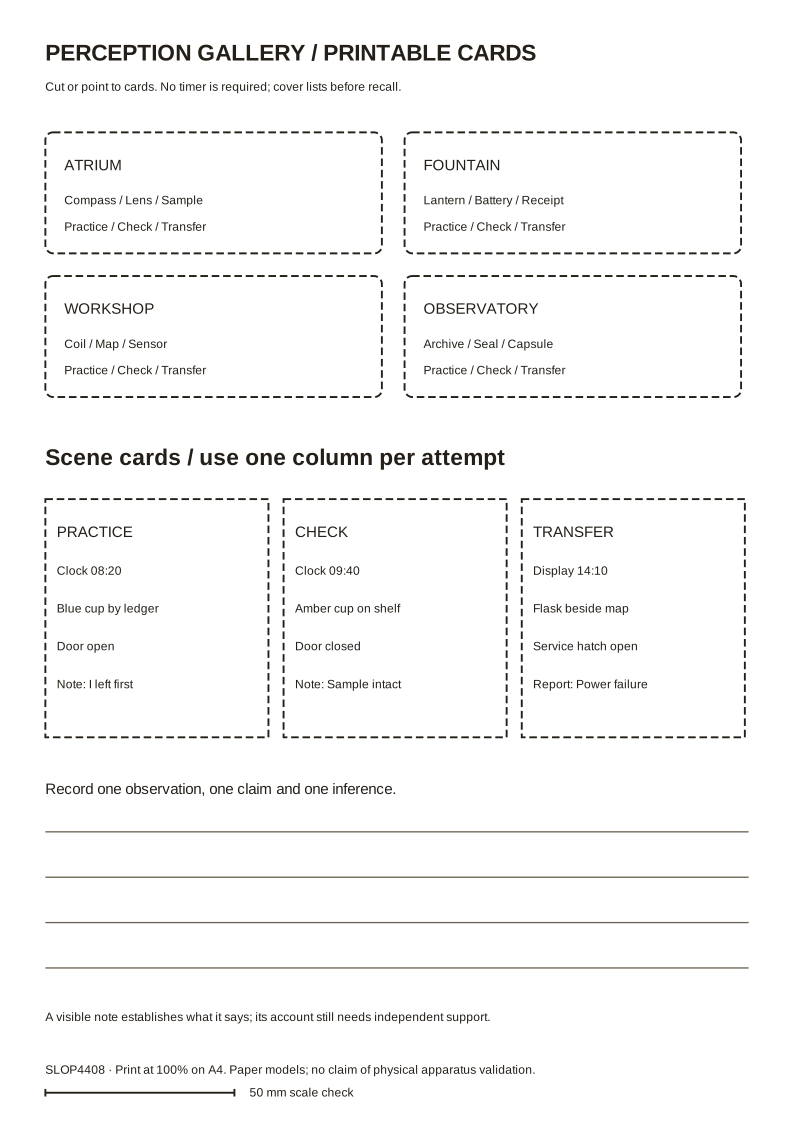
Equipment: A table, printed clock/display cards, cup/flask cards, a ledger/map, open/closed door cards and the supplied written claims. All equipment can be paper.
Setup: Print the five scene statements and arrange simple cup, clock and door cards to match them. Provide an optional cover for recall; written notes remain valid. Hold the follow-up evidence cards until students choose an inspection. Change the scene using the complete published check/transfer inventories.
What you do together: Inspect a staged scene, classify specific statements and propose two explanations. Request a record that can distinguish them, then revise a bounded conclusion. Recall is optional.
The printable facilitator pack includes rules, prompts and explanation. Campus apparatus is a proposed teaching design; physical construction and handling have not been validated by browser tests. Use the paper model when equipment is unavailable.
Keep the same prediction, changed-condition attempt and explanation as the online route. A dated observation, test, agreement or route sheet serves as the action record. Add acknowledgement where a handoff is part of the task; an additional browser run is not required.
Online lab · equivalent participation and revision
Do these actions in order
- Select Practice. Use each Inspect… control for the clock, cup, door and note; camera movement alone does not record inspection.
- Classify each statement as Observed fact, Someone’s claim or An inferred explanation. You may keep the scene visible; recall is optional.
- Read the competing explanations. Choose a Follow-up investigation and state what its possible results could establish before selecting Run selected investigation.
- Read the returned record and answer What does the new evidence support?. Preserve what remains unresolved; do not claim the record proves motive or identity when it does not.
- Select Test this configuration, read the feedback and save with Record attempt in skills passport before changing phases. The field extension is optional.
- Repeat in Skill check and Transfer challenge. Each changes the explanation and available investigation; choose afresh. Afterwards compare the evidence that changed your view.
Optional field extension
Your investigation, experiment, agreement or revision is already the practical output. You may also stage its consequence in the scene; this extension is not required for the learning record. In Field operation, first Inspect mission station. Once your skill check is verified, select Transmit the verified scene report. The scene and mission record now show the consequence: Control receives an evidence-labelled report and clears the investigation entrance. Unverified explanations remain unresolved.
Collect the named result or record, follow the checkpoint controls in order (or visit the marked stations in the scene), and select Confirm Control received the report at the receiver. The optional extension displays Mission accomplished after that acknowledgement; your learning record does not require it. Keyboard and touch controls perform the same actions. If you change the underlying model, the dependent intervention must be verified again.
Keep any field-extension actions separate from the evidence supporting your practical decision. Neither its completion nor its absence determines an academic grade.
Finish and keep your work
After each practical phase, open After playing · explain and save this attempt, write a brief reflection and select Record attempt in skills passport before switching phases. Keep the attempts and changed-condition evidence you discuss; an unfinished attempt can still be useful if you explain its limit. Export a backup using the passport tools.
For an uninterrupted view, choose Fullscreen mission. The Mission & controls panel contains the task and lesson controls. Scroll over the scene to zoom, click and drag to turn with the cursor free. Press X to lock the cursor for mouse-look; press X again (or Tab) to free it for scrolling and choosing options. Esc or Exit fullscreen returns to the page. Touch and keyboard controls remain available.
What leaves the room
observation-record
Keep two plausible explanations, the inspection you chose, the result that would have changed your mind, and your bounded conclusion. Classification is the beginning of the record, not its whole purpose.
Include scenario and assistance. Preserve a failed attempt if it explains a useful revision. Add approximately 100 words connecting result to decision.
A1 uses this method to choose which workshop condition needs investigation. The final project uses it to keep an arrival impression from becoming an unsupported operating assumption.
Feedback and explanation
Optional explanation and separate exemplar · open after an attempt
Classification applies to each assertion, not whether you believe its speaker. A discriminating follow-up can weaken an explanation without proving another. A record consistent with delivery does not identify the person; an earlier outage cannot be caused by a later hatch opening under these supplied timings. Optional recall is not the completion condition.
Worked reflection from the separate demonstration: I recorded 11:35, the green mug and the closed hatch. I kept ‘I checked every tray’ as the note author’s claim. My thirty-five-minute duration estimate lacked a start time. The later 11:50 reading and open hatch showed changes, not who caused them.
Inspect this example’s complete record. Use your own assigned scenario and observations for your reflection.
How to judge the response
A strong response makes a decision the instructions did not supply, supports it with evidence and explains an alternative or limit. A model check establishes its published conditions only; a facilitator judges reasoning. Text length and game endings are not academic grades.
Keep two plausible explanations, the inspection you chose, the result that would have changed your mind, and your bounded conclusion. Classification is the beginning of the record, not its whole purpose.
Closing reflection
Which error came from failing to inspect, and which came from expecting something to be there?
Afterwards
Export your record and keep a backup. It contributes to Weekly Fieldwork, with the best ten of twelve counting. Continue to the assessment brief and consult policies for access, collaboration and extensions. Exporting does not submit coursework.
SLOP UNIVERSITY · THE ACADEMY OF IMPOSSIBLE SKILLS
An original fictional course. Progress records practice, not academic certification.