Factorio: Engineering Addiction
Week 9 — Blueprints at Scale
Bots
Construction robots are what turns a captured design back into a real structure — and how fast that happens is set by roboport coverage, not by how big the blueprint is.
- a roboport’s logistic area (where both logistic and construction robots operate) is 50×50 tiles; its construction area (construction robots only) is a larger 110×110 tiles
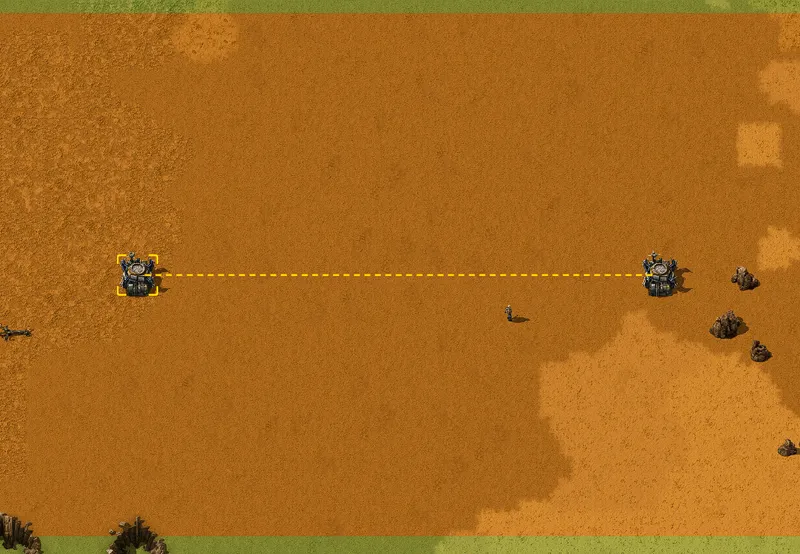
- two roboports link into a single network once their logistic areas touch or overlap — robots then travel directly between any two points in the combined network, not just within one roboport’s own coverage
Bot networks
- bots don’t migrate to a different nearby network on their own — only if their home network is destroyed outright (every roboport in it removed or cut from power) do they look elsewhere
- a large blueprint dropped where robot and material supply is thin doesn’t fail, it just goes up slowly — construction speed is a resource question (robots and materials available), not a placement question
Roboport charging
A blueprint’s build-out speed has a hard ceiling set by how fast bots can recharge, not by how many bots exist — this is the concrete mechanism behind “goes up slowly” on the previous slide.
- each roboport has exactly 4 charging slots, charging each bot at 1 MW, taking 1.5 seconds per bot — in practice that’s roughly 50-70 bots/min through one roboport, not more, however many bots are queued
- a roboport also carries a 100 MJ internal battery, letting it keep charging bots for a while even through a brief power dip
Roboport charging, at scale
- when a roboport’s charging queue gets long, bots slow down rather than wait idle — and past a point they’ll peel off to a more distant roboport instead, provided that port isn’t more than (queue size ÷ 2) tiles further away
- more roboports spread through the coverage area is a real throughput fix here — one enormous roboport-starved zone doesn’t parallelise no matter how many bots are dispatched into it
Bot flight and range
Range and speed aren’t roboport settings — they’re a fixed energy budget per bot, and that budget is what actually limits how far a delivery can travel from the network.
- a bot carries 1.5 MJ of energy, spends 3 kW just by being airborne, plus
5 kJ for every tile it covers — running that budget down gives a
maximum range, not an estimate:
1500 ÷ (3 ÷ speed + 5)tiles - with no speed research, that formula gives 250 tiles for logistic robots (base speed 3 tiles/s) and 257 for construction robots (3.6 tiles/s) — construction bots go slightly further because they’re slightly faster, spending less time (and 3 kW-of-time) per tile
Bot range budget in use
- a bot heads back to recharge once it hits 20% of its energy — so 80% of its usable range is spent travelling toward the target, the remaining 20% toward a charging point instead
- a bot that runs out of charge entirely doesn’t stop — it drops to 20% of normal flying speed and limps to the nearest roboport that’s still progress toward its destination, rather than backtracking
Bots, in practice
Source: Factorio Wiki, CC BY-NC-SA 3.0.
That dashed line is the network, not just the two ports — everything between them is now reachable in one delivery, provided the chain of overlapping coverage holds.
Logistic chest types
“Put a chest down” isn’t one decision — five chest types exist specifically because a network needs to distinguish “always take from here,” “take if nothing better,” “keep until wanted,” and “fill this up” as different behaviours, not just different inventories.
- active provider — pushes its contents into the network immediately and unconditionally; emptied first, ahead of everything else
- passive provider — offers its contents to the network, but only once nothing higher-priority is available; the default choice for “the output of a machine,” per the practical’s own goal
Logistic chest types, continued
- buffer — a requester and a passive provider in one: it fills to a requested amount, then offers that stock onward at passive-provider priority, useful as a mid-tier reserve between production and delivery
- storage — holds whatever gets dumped on it with nowhere else to go, and self-organises: bots prefer a storage chest already holding that item type over an empty one, which is why a storage array gradually sorts itself by item without anyone arranging it
- requester — pulls a configured amount from the network; the player and requester chests get first claim on incoming deliveries, buffer chests are served after
Chest priority order
Five chest types only work as a system because pickup and delivery each follow one fixed order, not first-come-first-served.
- pickup order runs active provider → storage/buffer → passive provider; delivery order runs player/requester → buffer
- getting this backwards — an active provider chest used as ordinary storage, say — means the network drains it immediately, not on demand
Logistic chest types, in practice
Source: Factorio Wiki, CC BY-NC-SA 3.0.

This is the priority order made visible: the active provider chests get emptied on sight, feeding straight into whatever’s requesting — exactly why bots, not belts, handle the very short, very high-throughput hop at a train stop like this one.
Bot cargo and reservations
A bot’s stated inventory number and what’s actually sitting in the network can disagree, and it isn’t a bug — it’s the network showing its work.
- a bot carries 1 item by default (research raises this) — cargo capacity, not travel speed, is what worker robot cargo size research actually buys
- the network’s item count is what’s in provider/buffer/storage chests minus whatever’s already been reserved by a bot en route to collect it — a bot always reserves its full carrying capacity the instant it’s dispatched, even if the chest doesn’t currently hold that much
Reading a negative count
- that reservation is why the count can briefly go negative: a network with 1 iron plate and a bot capable of carrying 4 shows -3 the moment that bot commits, and settles back to 0 once it actually arrives and finds more had been added in the meantime
- negative numbers aren’t a deficit against requester demand — with no bots actively picking anything up, the count never goes negative no matter how much is being requested
Blueprints
A blueprint isn’t a picture of a layout — it’s a captured configuration: every entity’s position, and everything wired into it, ready to be placed again exactly as it was.
- circuit network connections and combinator signal conditions are part of the capture, not just the physical entities — a blueprint of a circuit-controlled line reproduces the logic, not just the belts
- capturing a working design with bots (select the area, confirm the blueprint) is the same operation whether it’s five entities or five hundred — scale doesn’t change the process, only what gets checked afterward
Blueprints and logistics groups
- a blueprint is only as good as the design it was taken from — it reproduces mistakes exactly as faithfully as it reproduces working ratios
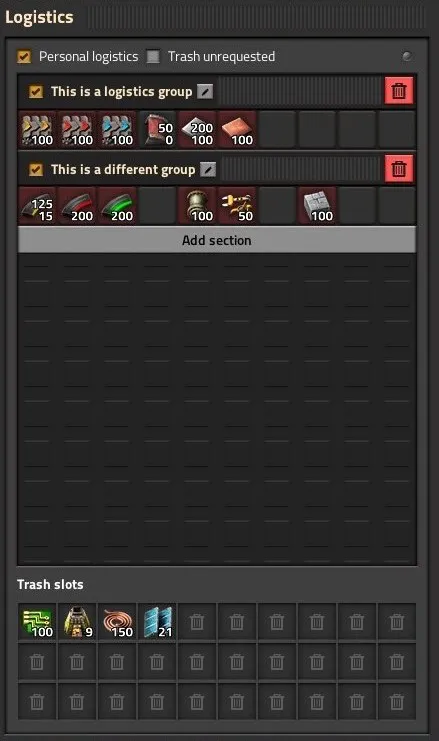
- a logistics group name (a named set of logistic requests on a requester or buffer chest) is captured too, but groups are global by name, not per-blueprint — pasting a blueprint into a world where a group of that name already exists makes the new chests adopt the existing group’s requests, not the ones saved in the blueprint, silently
Blueprints, in practice
Source: Factorio Wiki, CC BY-NC-SA 3.0.
Groups are named and toggled here, and that name is the thing a blueprint actually carries — reusing a name on purpose shares one edit across every chest tagged with it; reusing one by accident is the silent-adoption trap from the previous slide.
Stack sizes
Blueprint sizing and chest-capacity planning both come back to one number per item — its stack size — which is not the same across items and isn’t obvious just from looking at an icon.
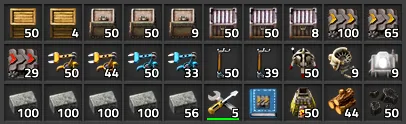
- stack size runs in a small set of fixed tiers: 1 (nuclear fuel, blueprints, modular armor), 50 (ores, modules, all assemblers and chests, gun and laser turrets), 100 (plates, gears, belts, pipe, concrete), 200 (circuits, science packs, ammo magazines)
Chest capacity and stack limits
- a chest’s usable capacity is stack size × slot count, so two chests holding different items are rarely holding the same amount even at the same fill level — a full chest of iron plate (100/stack) holds far more items than a full chest of gun turrets (50/stack)
- a chest or wagon’s stack count can also be manually capped below its default, freeing space without adding a whole extra container — useful for stocking a small buffer without dedicating a full chest’s worth of resources to it
Stack sizes, in practice
Source: Factorio Wiki, CC BY-NC-SA 3.0.
Stack limits, in practice
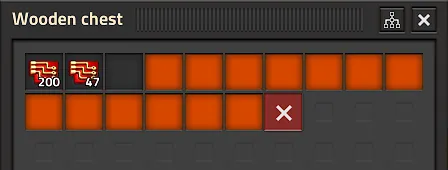
Source: Factorio Wiki, CC BY-NC-SA 3.0.
Same mechanic underneath both images — a slot holds one stack of one item, and that stack’s size is fixed per item, whether or not the slot’s limit has been manually capped below it.
Tiling
A tileable blueprint is one whose edges were designed on purpose, so that placing a second copy directly against the first needs no manual patching — belts, pipes and power all pick up across the seam.
- belts on one copy’s edge continue into the next only if they’re the same lane, same direction, and directly adjacent — a one-tile gap or a lane on the wrong side breaks the connection
- pipes connect the way pipes always do: two ends occupying adjacent tiles join automatically, so the edge just needs matching pipe positions
Tiling: power poles
- power poles auto-connect within wire range, but not without limits — no pole auto-connects to more than 5 others, and two already-connected poles won’t auto-accept a third that would close a triangle between them (covered in Week 8) — an edge pole can silently fail to bridge to the next copy’s for either reason, worth checking, not assuming
A blueprint that only tiles by luck stops tiling the first time the layout changes.
Designing the edge deliberately — matching lanes, matching pipe ends, checking wire reach — is what makes tiling a property of the design, not an accident of this one placement.
This week’s practical
Goal: a tileable blueprint converting iron and copper plate to green
      science packs
Test: capture the design with bots, then place a second copy edge to edge
      with the first
Pass: the blueprint converts plate to green science packs at a stated
      ratio; two copies placed edge to edge connect belts, pipes and
      power without manual patching; the blueprint is captured with bots,
      not placed by hand
Keep this blueprint once it passes — Week 11’s megabase-scale work assumes tiling discipline like this is already solved.