Factorio: Engineering Addiction
Week 6 — Rail Engineering
Fluids on trains
Pipes have a real throughput ceiling once a fluid needs to travel far — fluid wagons move the same fluids in bulk over a fixed route instead, trading pipe segments for train capacity.
- a fluid wagon is filled and drained by pumps, not by the offshore pumps used to draw water from a body of water — different tool, same word, and only three pumps can attach to a single fluid wagon at once, a hard ceiling on how fast one wagon can load or unload regardless of station design
- a cargo wagon has a bigger ceiling but the same shape: up to twelve inserters can work one wagon, six per side — station throughput scales with inserter count up to that limit, then stops scaling no matter how much more track or how many more chests get added
When rail beats pipe
- moving a fluid by rail instead of pipe only pays off once the distance is long enough that pipe throughput (covered in Week 4) would otherwise be the bottleneck
- the trade is the same one belts and rail always make: rail wins on long fixed routes, direct connection wins at short range
Trains: acceleration
Two properties decide how a rail network behaves under load: acceleration, set by locomotive count and fuel grade, and braking distance, set by the wagon-to-locomotive ratio.
- a single locomotive with no wagons tops out at 72 tiles/second, reached at 9.26 tiles/second² of acceleration — every other figure here and on the next slide varies those two baseline numbers
- acceleration is proportional to forward-facing locomotives divided by total train mass — two forward-facing locomotives roughly double it for the same wagon count, and adding wagons without locomotives dilutes it
- better fuel raises both acceleration and top speed (solid, rocket and nuclear fuel each add a further step) — more locomotives raise both further still
Trains: braking and length
- braking distance depends only on the wagon-to-locomotive ratio, not overall length — a 1-4 and a 2-8 train (same ratio) brake over the same distance, because deceleration is proportional to (wagons + locomotives) ÷ total mass, and that ratio is unchanged by simply doubling everything
- train length is a real design constraint, decided once, upfront: every signal and passing-track spacing rule downstream assumes a known maximum length — pick it before laying rail
Intersections
A block is a length of track with no signal breaking it — Factorio’s only rule is that at most one train occupies a block at a time, and a train long enough to span several blocks at once occupies every one of them, not just the one its front end is in. Regular signals and chain signals enforce that rule differently, and mixing them up is where deadlocks come from.
- a regular signal turns red once a train enters the block ahead — safe to place where a train may sit and wait, since nothing else needs that space
- a chain signal looks past itself to the signal after it, turning red if that block is occupied too — what a train must see before entering a junction, crossing, or station throat it must not stop inside of
Signal colours and spacing
- the colour a signal actually shows follows directly from the rule it enforces: green means the block ahead is free, yellow means a train has already been given approval to enter it, red means it’s occupied — a chain signal instead shows blue when at least one of the paths past it is blocked, but not all of them
- after any regular signal, leave at least the longest train’s worth of clear track before the next one — two junctions placed too close, each individually signalled correctly, can still lock two trains against each other
Intersections, in practice
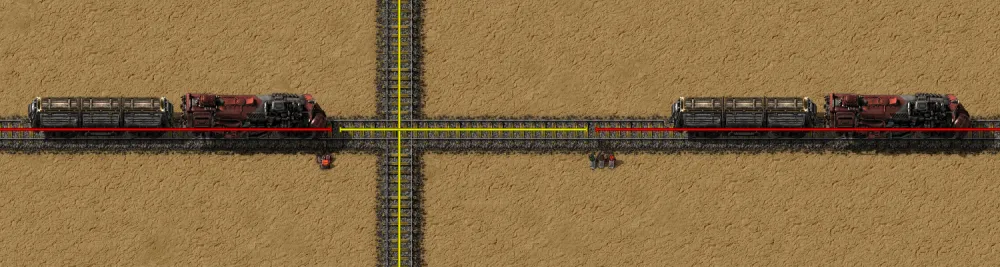
Source: Factorio Wiki, CC BY-NC-SA 3.0.
The waiting train’s chain signal is doing its job here — it won’t enter until the far side is clear enough for the whole train, not just the front of it.
Junction examples
“An intersection” covers a range of actual shapes, and each one changes where chain signals have to go.
- a fork (one line splitting into two) only needs a chain signal on the shared approach — once a train has committed to a branch, that branch behaves like ordinary single track
- a crossing (two lines meeting at grade) needs chain signals on every approach, because any of the four directions can be the one a train must not stop inside of
- a multi-track interchange is the same rule applied repeatedly — more approaches, but still just “chain signal anywhere entering a block a train can’t fully clear”
Junction examples, in practice
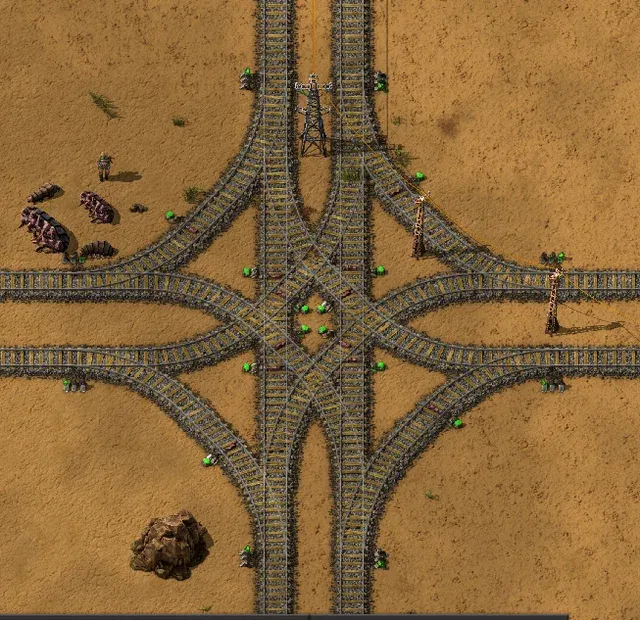
Source: Factorio Wiki, CC BY-NC-SA 3.0.
Every crossover here is another approach a chain signal has to guard — more track shapes, same one rule from the last slide.
Merges need more signals than forks
A fork and a merge aren’t signalled the same way, even though both look like “one line becomes two” from a distance — the rule that decides it is what a train can’t be allowed to stop inside of.
- a fork needs a chain signal only on the shared approach — once committed to a branch, that branch is ordinary single track and a regular signal is enough
- a merge needs a chain signal on every approach, because either train could end up the one stopped inside the shared block — chain-signalling only one side still lets the other commit into an occupied merge
- the wiki names exactly this — an uncontrolled crossing or merge — as a common cause of full network deadlock, where a train stops mid-junction and nothing behind it can move either
Merges, in practice
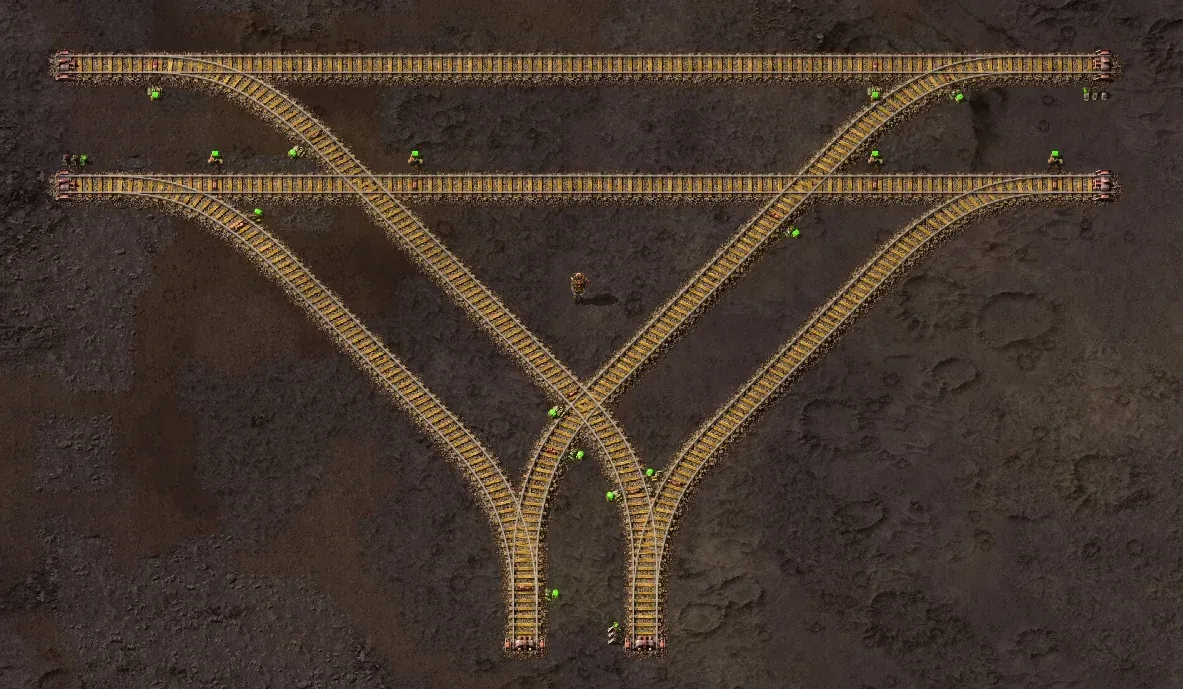
Source: Factorio Wiki, CC BY-NC-SA 3.0.
Two merges, not one — every curve landing on that shared track needs its own chain signal, which is twice the signalling a single fork this size would need.
Bypass sections, in practice
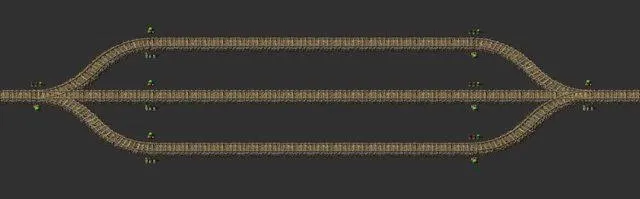
Source: Factorio Wiki, CC BY-NC-SA 3.0.
This is this week’s practical in miniature — a three-lane line with a bidirectional middle section is exactly this shape, signalled so opposing trains never contest the shared block at the same time.
Stations
A station is only as good as its slowest interaction with a train — most rail networks that seem too slow are actually bottlenecked at loading or unloading, not on the track between stations.
- station throughput sets a hard ceiling on how much a rail line can move, independent of train speed — a fast train sitting at a slow station doesn’t move any more cargo per hour than a slow one would
- train stop names double as the addressable target for schedules — two stops sharing a name let a train pick whichever empty one is free, breaking ties between multiple empty options with a priority value (0-255, default 50) — this is what lets a station scale past one bay
Station limits and placement
- a train stop’s train limit caps how many trains may currently path to it as a destination; once full, a train destined there waits elsewhere rather than queueing on the main line — the setting a stacker (next slide) exists to make use of
- a train stop must sit on the right-hand side of the track in its direction of travel — placed on the left, a train can path toward it but never actually reach it, which the wiki names as the single most common cause of a “no path” error on an otherwise correctly-signalled line
Station fuelling and design order
- fuelling only works while a train is parked at a station or driven manually — an inserter can’t top up a locomotive that’s merely waiting at a signal or running in automatic mode, so a train that leaves a station under-fuelled can strand itself mid-route with no way to refuel until it reaches another stop
- design the loading/unloading rate first, then size the rest of the network to match it, not the other way around
Stackers
A stacker is a length of parallel holding track near a busy station, sized to hold several waiting trains at once — it exists because a train limit only stops a train from selecting a full destination, not from occupying a signal block somewhere else in the meantime.
- without a stacker, a train limit still works — no more trains end up at the station than the limit allows — but a turned-away train waits wherever it happened to be, often on the main line other trains need
- a stacker gives it somewhere specific to wait instead, off the route everything else is trying to use
- sized for the busiest realistic queue, not the average one — an undersized stacker just moves the same jam a few blocks further back
Terminus and loop stations
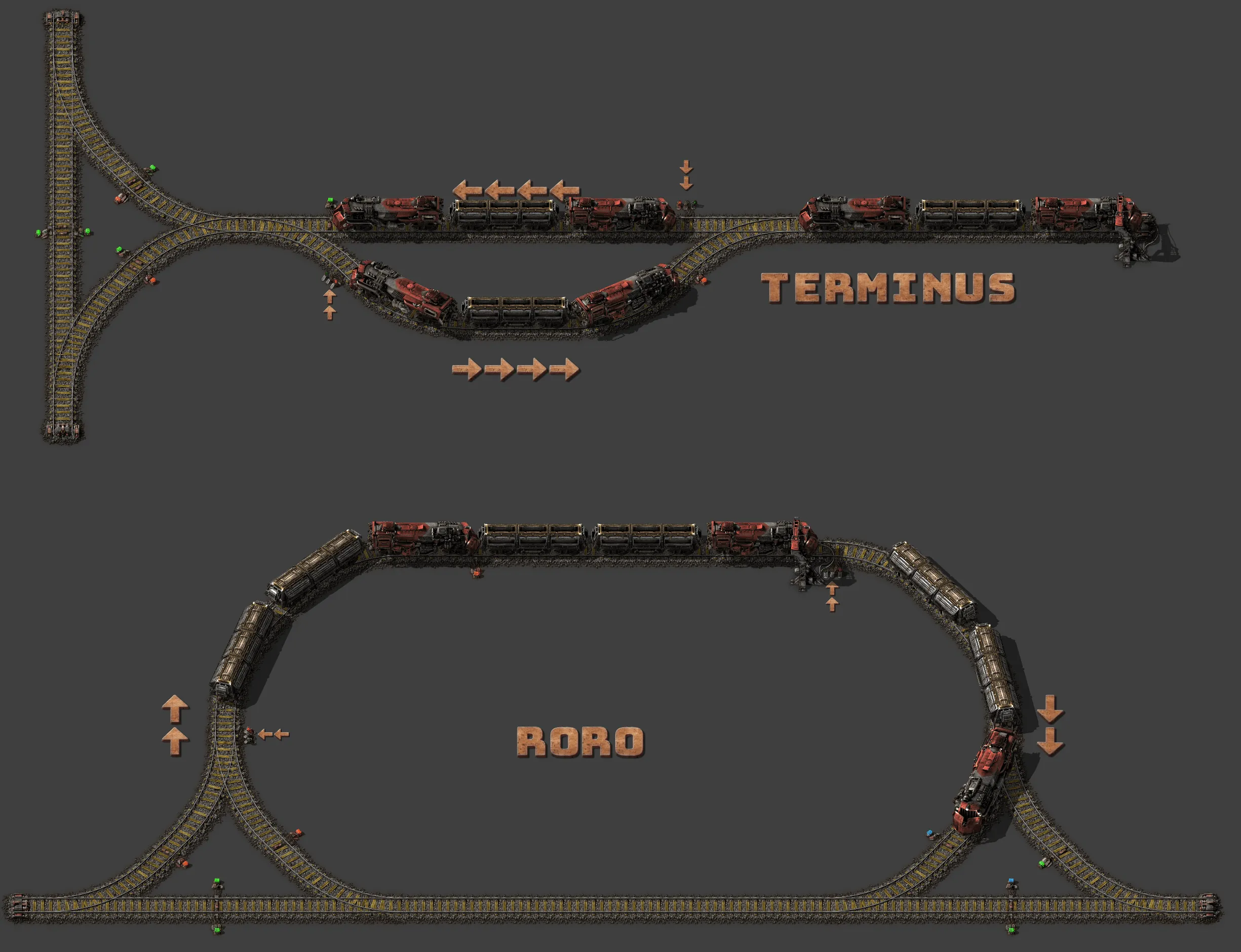
Every station is either a stub a train reverses out of, or a loop it drives straight through — the choice changes what the train looks like.
- a terminus (stub-end) station needs a locomotive on both ends, or it can’t leave without reversing — a single-headed train arriving here is stuck until turned around
- a loop station (“RORO,” roll-on-roll-off) curves the train back onto the outbound track, so a single-headed train drives straight through and never reverses
- the trade is space for simplicity: a loop costs the track and footprint for the curve; a terminus costs a second locomotive, fuel and maintenance on every train that uses it
Terminus and loop stations, in practice
Source: Factorio Wiki, CC BY-NC-SA 3.0.
Same job, two different train requirements — a terminus buys its simplicity back with an extra locomotive; a loop buys it with track.
Automating train lines
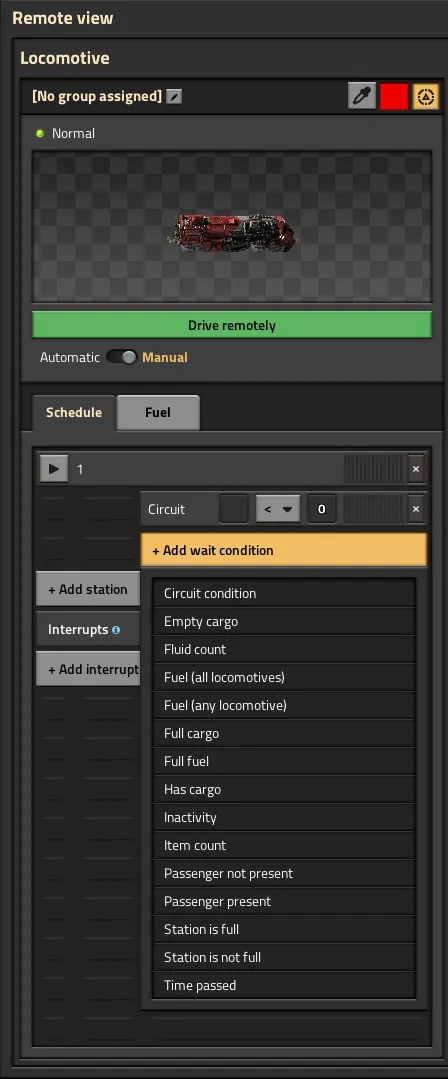
Automatic mode turns a train’s schedule — a sequence of named stops, each with a wait condition — into the entire driving logic; nothing about it requires a human at the controls, or even present.
- a wait condition (full cargo, empty cargo, inactivity, a circuit signal) decides when a train leaves a stop, not a fixed timer — lets a schedule adapt to actual supply and demand instead of a guessed interval
- named stops plus simple conditions are enough for a train to run an entire loop unattended — no circuit-network logic needed yet, that’s Week 10’s territory
- a badly-chosen wait condition looks identical to a correctly automated line until supply runs out and the train waits at an empty stop forever
Schedules, in practice
Source: Factorio Wiki, CC BY-NC-SA 3.0.
Schedules, in practice: groups
Source: Factorio Wiki, CC BY-NC-SA 3.0.
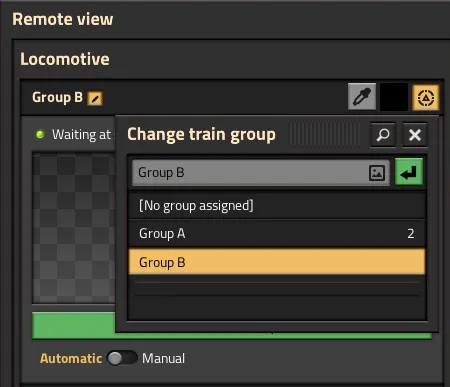
A schedule is edited once per group, not once per train — adding a train to an existing group hands it the same stop list and wait conditions immediately, with nothing to re-enter by hand.
A block enforces one rule: one train at a time. Every deadlock is a place someone forgot which signal makes a train wait, and which one makes it commit.
Regular signals are for waiting. Chain signals are for not committing to somewhere you can’t finish getting through.
This week’s practical
Goal: three-lane rail line, middle lane running bidirectionally
Test: run trains from both directions on the middle lane at once
Pass: the middle lane carries opposing traffic without a deadlock, and the
      design is explained in terms of signal blocks, not trial and error
Explain the signalling before you run the test — if you can’t say which signals are regular and which are chained and why, the test passing is luck, not design.