Week 9
The vocabulary of almost-autonomy
When the car starts giving advice instead of just reporting state, what is the alert actually claiming?
From symptom to decision: the first dashboard sentence about the car’s own agency.
Learning objectives
By the end of this week you should be able to:
- distinguish an alert that reports a state of the world from one that narrates a decision the car itself is making
- explain why Volvo’s City Safety (2008) is a turning point in dashboard vocabulary, not just an early example of automatic braking
- identify, given a real ADAS alert, which category it belongs to and justify the classification in one sentence
- compare two manufacturers’ interface treatments of the same underlying warn-vs-intervene decision
- trace the decision-to-alert chain from sensor detection through to the driver’s remaining decision space at the moment the alert fires
Opening example: a beep, a flash, then the car brakes itself
A driver is approaching a queue of stopped traffic, attention on the radio for a second too long. A red icon — a car silhouette with radiating brake lines — flashes on the cluster. An urgent, fast-repeating tone sounds at the same instant. Before the driver has consciously registered either, the car brakes itself, harder and sooner than the driver would have chosen to.
The driver’s first coherent thought isn’t “what does that icon mean” — it’s “did I do that, or did the car?”
Opening example: what the car is actually saying
Every warning light this course has studied up to now has meant some version of “here is a fact, you decide.” This one doesn’t. The icon and the tone aren’t describing the queue of stopped traffic — the driver can see that already. They’re describing the car’s own corrective action: I am braking, right now, because you didn’t.
That is a genuinely new kind of sentence for a dashboard to produce, and it’s worth pausing on why: it is the first widely-deployed moment where the alert’s subject is the car’s own behaviour, not the world outside it.
Two sentence types, same red light
“Your oil pressure is low” and “I am braking” can be rendered with the exact same red telltale, the same urgent tone, the same half-second of the driver’s attention. But they are different kinds of claim:
- A report describes a condition that exists independently of what the driver does next. Ignore it, and the condition doesn’t change.
- A narration describes an action the car is taking, or about to take, regardless of what the driver decides. Ignore it, and something still happens — the car acts anyway.
Weeks 1 through 8 of this course were entirely about the first kind.
What “reports a state” alerts have in common
Every alert this course has studied so far — the oil-pressure idiot light (week 3), the ISO tyre-pressure pictogram (week 4), the red/amber/green telltale bank (week 5), the seatbelt chime (week 6), the plain-language multi-info-display message (week 7), even the HUD navigation arrow (week 8) — shares one structural property: the driver retains full decision space. The car supplies information; the driver supplies the action. The sequence is always detect, tell, wait, act.
What changes when the alert narrates a decision
An almost-autonomy alert breaks that sequence in a specific, mechanical way: the “act” step moves earlier, sometimes ahead of the “tell” step, because the car doesn’t need the driver’s permission to act and physics doesn’t always leave time to ask for it anyway. The driver is no longer told about a condition and left to decide — they’re told about, or discover through the car’s own motion, a decision that has already been made for them. Every earlier grammar in this course assumed the driver was the last actor in the chain. This grammar doesn’t.
Comparison within this section: warn-only vs warn-and-intervene
Take the same underlying hazard — a slow-moving hazard ahead, driver not reacting — handled two different ways.
| Aspect | Warn-only forward-collision warning | Warn-and-intervene automatic emergency braking |
|---|---|---|
| What the driver perceives | A visual and audible alert, full stop | The same alert, plus the car braking under them |
| What the driver must still decide | Whether and how hard to brake | Nothing, unless they want to override |
| Failure mode if the alert is wrong | An unnecessary startle, no physical consequence | An unnecessary deceleration the driver didn’t choose, felt physically by everyone in the car |
| What the interface has to communicate | “This is worth your attention” | “This is worth your attention, and also I have already acted on it” |
The second column is this week’s entire subject.
Real example: Toyota Safety Sense and the Pre-Collision System
Toyota is useful here because it deployed its Pre-Collision System, paired with automatic braking, across nearly its entire mainstream lineup at low cost and extremely high volume from the mid-2010s onward. That makes Toyota’s warn-and-brake interface — an audible warning plus a red brake-warning graphic in the driver information display, followed by autonomous braking if the driver doesn’t respond — one of the most widely experienced almost-autonomy interfaces on the planet, simply through scale. It’s the default most drivers will meet first, which makes it the baseline every other manufacturer’s choice gets compared against.
Real example: Honda Sensing and a third channel
Honda’s Collision Mitigation Braking System (part of Honda Sensing) is useful for a different reason: alongside the visual and audible warning, Honda pairs an automatic seatbelt pretensioner tug — a haptic cue — timed to the same imminent-collision judgement. That’s a manufacturer deciding two channels (sight, sound) aren’t enough to narrate a decision the driver’s own body is about to feel, and reaching for a third channel that arrives through touch rather than attention. It’s a useful contrast to Toyota’s audio-visual-only approach for exactly that reason.
Real example: Tesla and minimal narration
Tesla’s Autopilot forward-collision warning sits at the opposite end of the same design question: a brief chime and a small visual indicator on the instrument display, with comparatively little elaboration before or during automatic braking. That minimalism is a design position, not an oversight — it reflects a bet that once a system is trusted to act, less narration is required, not more. Whether that bet is correct is exactly the kind of question the false-alarm research in week 10 is built to test.
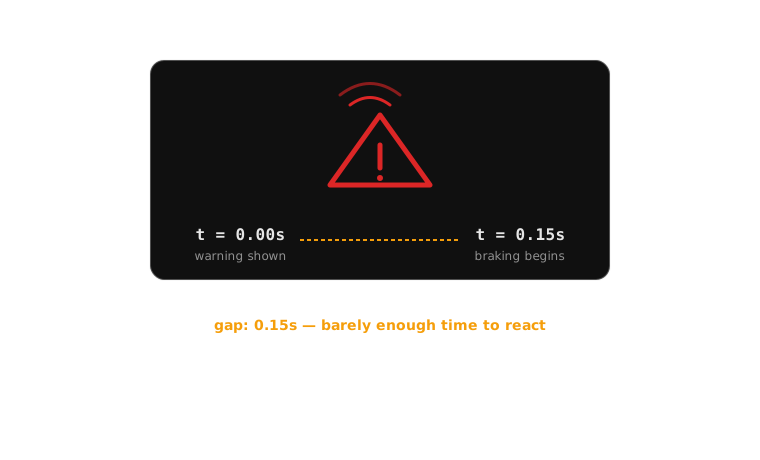
The warning and the braking can arrive close enough together that the driver has no time to act on the warning before the car already has.
The decision-to-alert chain
An almost-autonomy alert isn’t one event — it’s the visible tail end of a pipeline the driver never sees the rest of:
- Sensor detects a hazard — radar, camera, or lidar identifies an object or condition ahead
- System estimates risk — typically time-to-collision, compared against a threshold
- System decides: warn only, or warn and intervene — based on whether there’s enough time budget left to give the driver a chance to act first
- Alert is issued — which may happen simultaneously with, not before, the car’s own corrective action, if step 3 concluded there wasn’t time
- Driver interprets the alert — as either a heads-up about what’s about to happen, or an explanation for what they just physically felt
- Driver’s remaining decision space is now smaller than it would be for a purely informational alert — in the shortest-range cases, it may be close to zero
The chain, staged: how much choice is left at each point
| Stage | What has happened | Driver’s remaining choice |
|---|---|---|
| Hazard detected | Nothing visible to the driver yet | Full — they don’t know yet |
| Risk estimated, time budget sufficient | Warning issued, no braking yet | Full — driver can brake, steer, or ignore |
| Risk estimated, time budget short | Warning and braking issued together | Partial — driver can add more braking, or override |
| Time budget effectively zero | Braking issued, warning may lag or be simultaneous | Minimal — the car has already committed |
Compare this against any “reports a state” alert from earlier weeks: the driver’s remaining choice stays at “full” for as long as they choose to leave it there. That column never shrinks on its own. This one does.
Case study: Volvo City Safety, 2008
Volvo introduced City Safety on the first-generation XC60 in 2008: a low-speed system, originally active below roughly 30 km/h, designed to prevent or soften the single most common urban collision — a nose-to-tail shunt in slow, stop-and-go traffic. A forward-facing sensor mounted near the top of the windscreen tracks the vehicle directly ahead. If the system judges a collision imminent and the driver hasn’t already braked hard enough, City Safety applies the brakes on its own.
This wasn’t marketed as a warning system. It was marketed as a system that acts — the warning, where one exists at all, is secondary to the intervention itself.
Case study: the original interface logic
City Safety’s interface followed a staged logic that became the template for almost every AEB system that followed: where the time-to-collision estimate leaves enough margin, the driver gets an audible and visual warning first — a genuine chance to brake themselves before the car does it for them. Where the margin is too short for a warning to do any good, the system skips straight to braking. The logic is defensible on its own terms: a warning that arrives after the braking has already had to start isn’t warning the driver of anything they can still change — it’s just noise layered on top of an action already underway.
Case study: strengths
The staged approach gets real things right. It preserves the driver’s authority whenever there’s genuinely time to use it — the car doesn’t brake first out of caution if a plain warning would have been enough. It matches the intervention to the physics of the situation rather than applying one fixed response to every case. And by focusing marketing and design attention on the action rather than the warning, Volvo avoided the trap of over-designing a warning display for a system whose real job was to act faster than any display could be read.
Case study: weaknesses — the ambiguity of “did it, or is about to”
The same staging creates the case study’s defining weakness. In the shortest-range cases — exactly the cases where the system is doing the most important work — there is no meaningful warning at all, because there’s no time budget for one. A driver who feels the car brake hard with zero preceding cue has no way to tell, in that instant, whether the car has just corrected a hazard they never even saw, or whether something has gone wrong with the brakes themselves. The alert that would resolve that ambiguity is precisely the one the shortest-range cases can’t afford to give.
Case study: consequences and a suggested synthesis
The consequence for the driver is a genuine interpretive gap at the exact moment they can least afford one — mid-intervention, needing to decide whether to trust the car’s action, override it, or brace for a fault. A workable synthesis: keep the staged warn-then-brake logic wherever the time budget allows it, since it correctly preserves driver authority — but add a distinct, sustained visual state (not just a chime, which is already over by the time it would help) timed to the onset of any autonomous braking, so that even a driver with zero warning time can retroactively read “the car just intervened” rather than “the car just malfunctioned.”
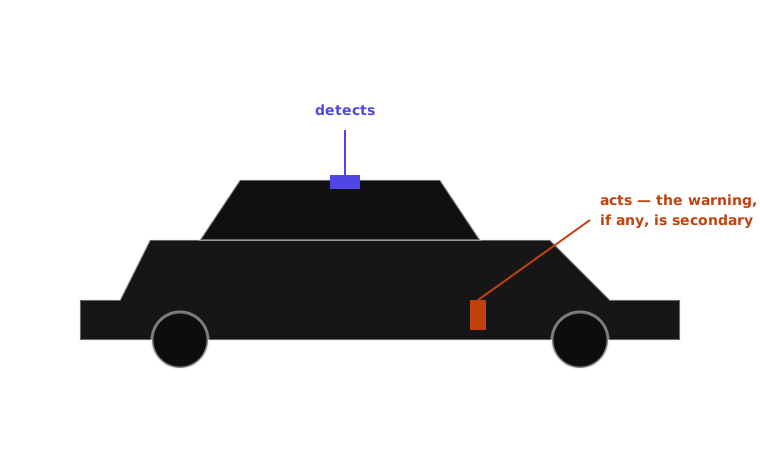
City Safety was designed and marketed around what the car would do, not around what the driver would be told.
Comparison: reports a state vs narrates a decision
| Dimension | Reports a state (e.g. low-fuel light) | Narrates a decision (e.g. AEB activation) |
|---|---|---|
| What it describes | A condition in the world | An action the car is taking |
| When it can arrive | Any time before the condition worsens | May arrive simultaneously with, or after, the action itself |
| Driver’s remaining decision space | Full, for as long as the driver leaves it | Reduced, sometimes to near zero |
| Cost of being wrong | Driver ignores it; no physical consequence | Driver feels an unwanted physical action (deceleration, steering nudge) |
| Design bar | Must be recognisable and correctly prioritised | Must be recognisable, correctly prioritised, and distinguishable from a malfunction |
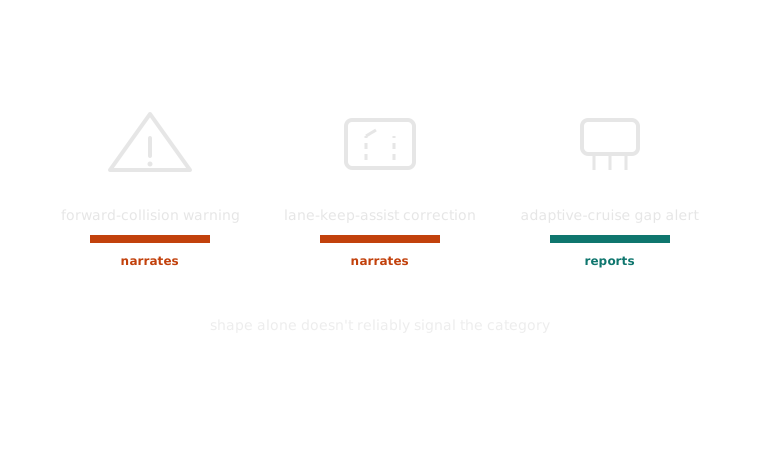
Nothing about an icon’s shape tells you, on its own, whether the car is reporting or about to act — that has to come from context, timing, or a deliberately different treatment.
Classroom activity: sort the alert, defend the sort
Task: In pairs, take the list of a dozen real driver-assistance alerts handed out this week (forward-collision warning, lane-keep-assist steering correction, adaptive-cruise-control gap-closing alert, automatic-emergency- braking activation, blind-spot monitoring, and others). Sort each one into “reports a state” or “narrates a decision.”
Then inspect: which alerts did every pair agree on immediately? Which ones split the room?
Discuss:
- For the alerts everyone agreed on fast, what made the category obvious?
- Pick one alert your pair disagreed on — what specifically made it ambiguous rather than just a mistake by one of you?
- Which category — report or narration — do you think is structurally harder to design well, and why?
Mini knowledge check
- In one sentence, what is the structural difference between an alert that “reports a state” and one that “narrates a decision”?
- Why did Volvo’s original City Safety interface place so little emphasis on a driver-facing warning display, particularly in the shortest-range cases?
- Name one manufacturer example from this deck that uses a channel other than sight or sound to narrate an imminent decision, and name that channel.
- Scenario: a new ADAS feature can only warn the driver 200 milliseconds before it acts — not enough time for the driver to do anything useful with the warning. Based on this week’s case study, should the manufacturer skip the warning entirely? Why or why not?
Summary
- Every alert through week 8 reported a state and left the decision to the driver; this week’s alerts can narrate a decision the car has already made
- The warning and the corrective action can arrive together, or the action first — physics, not bad design, usually forces that ordering
- Volvo’s City Safety (2008) set the template: warn first when there’s time, act without warning when there isn’t — a defensible trade-off with a real cost
- That cost is a genuine interpretive gap: a driver who feels the car act with no preceding cue can’t immediately tell intervention from malfunction
- A narrating alert has to do everything a reporting alert does, plus avoid being mistaken for a fault — which is why it’s the harder design problem
Next: cry wolf — trust and alarm fatigue
This week’s vocabulary is more assertive than anything the course has studied before — it doesn’t just inform, it announces the car’s own agency. Week 10 asks the question that assertiveness makes urgent: what happens to a driver’s trust in that vocabulary the tenth time it narrates a decision that turns out to have been unnecessary?