Heads-up
The dashboard on the windscreen
Guiding question: what changes when the instrument moves from the dashboard to the windscreen?
Learning objectives
By the end of this week you should be able to:
- Identify the two structurally different HUD technologies (fixed combiner-glass readouts vs. conformal, eye-tracked AR projection) from a photo or description alone
- Compare the 1988 Oldsmobile Cutlass Supreme HUD and a modern AR HUD on what each is capable of pointing at, not just how each looks
- Explain why moving an instrument into the driver’s forward view creates a new risk (visual clutter over the road scene) even as it removes an old one (glance time)
- Trace the four-stage pipeline that turns a sensor or navigation event into a windscreen graphic
- Argue, with a specific example, for where the line sits between a HUD graphic that helps and one that has started competing with the road for the driver’s attention
Opening example: the Mazda Active Driving Display
Most HUD-equipped cars sold today still ship something close to Oldsmobile’s original idea, just sharper. Mazda’s Active Driving Display, standard on much of its current range, projects a simple full-colour readout — road speed, speed-limit sign recognition, turn-by-turn arrow, adaptive cruise status — low in the driver’s forward view, optically set a couple of metres ahead of the car.
The driver sees: a small cluster of numbers and one directional arrow, never overlapping the road itself, always in the same fixed position relative to the windscreen regardless of what’s happening outside it.
Opening example: why this is the baseline case
This is the baseline worth anchoring on before the deck gets more ambitious, because it is deliberately conservative in exactly the way the Cutlass Supreme was in 1988:
- it never claims to know where anything is — only what a number is
- it doesn’t move when the road moves
- it costs the driver almost nothing to ignore, because it never grows, flashes, or repositions itself without cause
Every more ambitious HUD in this lecture is a version of this same base case that has started trying to point at the world instead of just reporting a number. Keep that baseline in mind — it’s the control condition for everything that follows.
Two families of HUD technology
Not all HUDs work the same way, and the difference predicts what each one is capable of showing:
- Combiner-glass HUDs — a small transparent panel rises from the dashboard between the driver and the windscreen; the image reflects off it at a fixed angle. Cheap, compact, but the image only looks correct from one head position and can’t cover much of the driver’s view. This is essentially the Cutlass Supreme’s technology, refined.
- Windscreen-projected (waveguide) HUDs — the windscreen glass itself is the optical element, usually with a wedge-shaped interlayer that corrects for the glass’s curve. This is what large-field-of-view AR systems need, because the image has to be able to cover a much wider area of glass to stay registered with objects across the driver’s view, not just sit in one fixed spot.
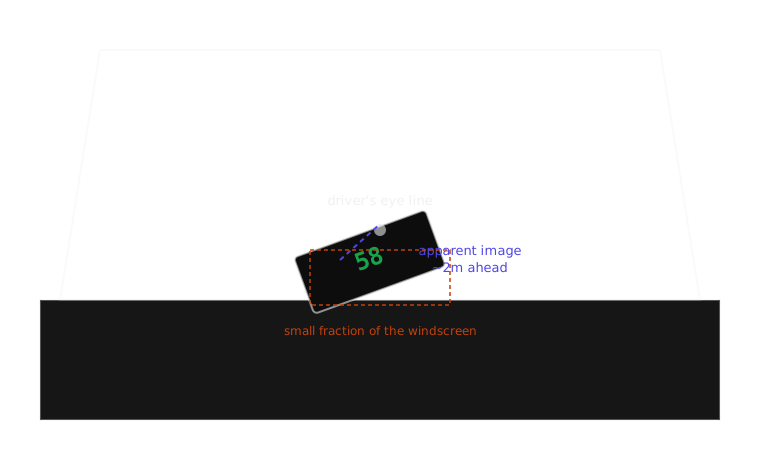
A combiner-glass HUD reflects a fixed image off a small panel — the direct descendant of the Cutlass Supreme’s approach.
The focal-distance problem
A HUD only removes the glance-down cost if the eye doesn’t also have to refocus. Human eyes take real time — measured in hundreds of milliseconds — to shift focus between a near object (a dashboard 70cm away) and a far one (the road, effectively at optical infinity). Early combiner HUDs solved half this problem: they moved the image up, but still projected it at a single fixed virtual distance, often only a couple of metres out.
Modern systems go further by rendering at two virtual depth planes at once — a near plane for status information (speed, cruise-control state) and a far plane, several metres out, reserved for graphics meant to register with the actual road (a navigation arrow, a hazard highlight). The two-plane approach is a direct answer to the single biggest limitation of the Cutlass-era HUD: everything on it lived at one depth, so nothing on it could ever convincingly sit “on” the road.
Real-world example: Volvo’s HUD as an alerts platform
Volvo’s HUD implementations are worth a close look for a reason distinct from image quality: Volvo treats the HUD as the display surface for its driver-assistance system, not just for speed. Adaptive cruise control status, lane-keeping-aid state, and forward-collision warnings all surface through the same windscreen graphic that shows speed. That decision matters for next week’s topic before we get there — once a HUD is the display for an alert that represents a decision the car is making (following distance, a lane correction), it stops being purely informational and starts being part of the negotiation between driver and system that week 9 is about.
Real-world example: Audi’s dual-plane AR HUD
Audi’s AR HUD (fitted to several current EVs in its range) is a useful counter-example to Mazda’s restraint: it deliberately maximises virtual image size and distance — Audi states a projected image the size of a large screen, apparently sitting many metres down the road — specifically so that navigation arrows can appear to be painted onto the actual lane surface rather than floating near the windscreen. It’s useful for this week because it’s the clearest commercial demonstration of the trade this lecture keeps returning to: the bigger and further-out the virtual image, the more convincingly it can register with the real world, and the more of the driver’s forward view it is now occupying to do so.
From reporting to overlaying
This is the conceptual hinge of the week. A dashboard gauge can only ever refer to itself: a needle at “80” means your speed is 80, and that statement is true regardless of anything outside the car. A conformally mapped HUD graphic makes a different kind of claim — it says this specific lane, that specific vehicle, this exact turn — and that claim is only true if the graphic is drawn in the right place, at the right size, updated continuously as the car and the driver’s head both move.
Direct comparison:
| Aspect | Dashboard gauge | Conformal AR-HUD graphic |
|---|---|---|
| What it refers to | Itself only | A specific object or location outside the car |
| Fails how | Shows a wrong number | Points at the wrong thing, or lags what it’s pointing at |
| Update dependency | Vehicle state only | Vehicle state and driver head/eye position |
How a HUD alert gets to the windscreen
| Stage | What happens | Example |
|---|---|---|
| 1. Signal arrives | A sensor or navigation system produces an event | Radar detects a closing vehicle; GPS reaches a turn |
| 2. Escalation decision | The system judges whether this event needs windscreen-level attention, or whether the dashboard is sufficient | A low-fuel warning stays on the dashboard; a forward-collision risk escalates |
| 3. Conformal render | The graphic is rendered and mapped to the driver’s tracked eye position and the road geometry ahead | The arrow is warped so it appears flat against the actual lane surface |
| 4. Projection | The image is projected via combiner or waveguide onto the windscreen | — |
| 5. Attention shift | The driver’s attention moves within their existing view — no head movement required | Eyes stay up; focus may still shift between depth planes |
The escalation decision is a design choice, not a technical inevitability
Stage 2 above is where most of the design judgement in this week’s case study actually lives, and it’s easy to skate past it. Every one of these systems could, in principle, put everything on the windscreen — speed, fuel, navigation, every telltale a modern dashboard carries. None of them do. The decision about what earns windscreen space is a claim about relative urgency and relevance to the immediate driving task, made once by a design team, then experienced thousands of times by drivers who never see the decision, only its result. Get it wrong in the direction of too little and the HUD is a novelty. Get it wrong in the direction of too much and you’ve built a AR windscreen full of exactly the clutter this lecture keeps warning about.
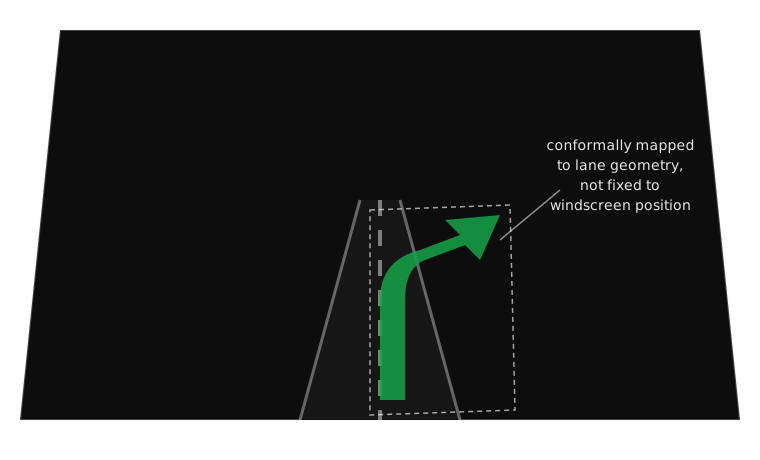
A conformal AR-HUD arrow doesn’t float near the windscreen — it claims to sit on a specific piece of road.
Case study, part 1: the 1988 Oldsmobile Cutlass Supreme
The Cutlass Supreme was the first mass-market car sold with a factory head-up display, and Oldsmobile did not pretend otherwise: the feature was marketed explicitly on its lineage from fighter-jet avionics, where HUDs had let pilots read airspeed and targeting data since the 1950s without looking down into the cockpit during high-speed manoeuvres where a lost half-second could be fatal.
Design intent: solve exactly one problem — the driver glancing down at the speedometer — by reflecting a green, monochrome digital speed number off a small combiner set low in the driver’s peripheral view. Nothing else. No navigation, no warnings, no colour beyond the single green.
Case study, part 2: what the Cutlass Supreme got right and wrong
Strengths:
- Solved the single highest-frequency glance in ordinary driving (checking speed) with almost no added visual complexity
- Fixed to the car, not the world — so it never needed to track the driver’s eyes, the road ahead, or anything external, keeping the engineering (and the failure modes) simple
Weaknesses:
- Fixed to the car, not the world — the same property is also the ceiling: the display could never point at anything, only report a number
- Monochrome green on glass, mounted low, was genuinely hard to read in bright daylight — a limitation combiner HUDs still partly inherit
- Consequence for the driver: real time-off-road savings on one specific task, and no capability at all for the harder problem — hazards, lanes, turns — that would come decades later
Case study, part 3: the modern AR HUD
Design intent: rather than reporting a number, place graphics that appear to occupy the same space as real objects on the road — a navigation arrow on the actual lane, a highlight around a pedestrian or stopped vehicle that the car’s sensors have flagged as relevant.
Strengths: the referent problem the Cutlass Supreme couldn’t touch is solved — an instruction like “turn here” can be drawn on here, and a hazard can be marked at its actual location rather than described in text the driver has to translate into a direction to look.
Weaknesses and consequences: every one of these graphics competes for the same limited real estate as the road itself. A wide-FOV AR HUD showing a navigation arrow, a following-distance marker, and a hazard highlight simultaneously has moved from annotating the driver’s view to partially occluding it — and unlike the Cutlass Supreme’s single green number, there is no natural ceiling stopping a manufacturer from adding a fourth graphic, then a fifth.
Case study synthesis: a suggested improvement
The Cutlass Supreme’s discipline (one channel, one job) and the modern AR HUD’s capability (conformal mapping to the real world) don’t have to trade off against each other; the missing piece in most current systems is a hard cap on simultaneous graphics, borrowed from the same escalation logic that keeps most telltales off the windscreen entirely. A workable rule: never render more than one conformal, road-registered graphic at a time: if a hazard highlight and a navigation arrow are both warranted at once, the hazard wins and the arrow waits half a second. The Cutlass Supreme never had this problem because it never had more than one thing to say. A modern AR HUD has to build the restraint in on purpose.
Comparison: a dashboard warning vs. its HUD equivalent
| Dimension | Dashboard warning light | Equivalent HUD alert |
|---|---|---|
| Eyes-off-road time | ~0.5–1s glance down and back | Near zero — no head movement |
| Cost to implement | Very low (single LED + icon) | High (combiner/waveguide optics, often eye-tracking) |
| Risk of visual clutter | Confined to instrument cluster, ignorable at a glance | Directly over the road scene — harder to ignore, and that’s the danger as much as the benefit |
| Best suited to | Non-urgent, self-referential states (fuel, oil temperature) | Time-critical or spatially specific alerts (collision risk, exact-lane guidance) |
Exercise: audit an AR HUD for clutter
Task: find a manufacturer’s own demonstration video or press image of a current AR HUD system (Mercedes-Benz, BMW, Audi, or another premium system of your choice) showing more than one graphic on screen at once.
Inspect: every distinct graphic element visible in a single frame — count them, and note which are conformal (registered to something specific outside the car) versus which are fixed-position status readouts.
Discuss:
- How many distinct graphics appear simultaneously in your chosen frame?
- Which one, if any, would you cut first under the “one conformal graphic at a time” rule proposed on the case-study synthesis slide?
- Is there a graphic in your frame that a driver could reasonably mistake for two different things?
- Would your answer change for a driver in heavy rain, at night, or on an unfamiliar road?
Mini knowledge check
- What is the one thing a fixed-position combiner HUD (like the Cutlass Supreme’s) can never do that a conformal AR HUD can?
- Name one design decision that a two-depth-plane HUD is trying to solve.
- A HUD is displaying a navigation arrow, a following-distance marker, and a speed readout at once. Which one, on the logic of this lecture, is safest to leave on-screen if you had to cut two?
- In one sentence: why does giving a display access to more of the driver’s forward view increase the designer’s responsibility rather than just their capability?
Summary
- A HUD’s core trade is glance time for optical complexity: it removes the cost of looking down, but only if focal distance and clutter are managed deliberately
- The real dividing line in HUD history isn’t “old vs. new” — it’s self-referential (a number about the car) vs. conformal (a graphic registered to something specific outside it)
- The Cutlass Supreme’s one-job discipline and the modern AR HUD’s world-registration capability are not opposites; a well-designed system needs both
- Escalating an alert to the windscreen is a design decision made once and experienced thousands of times — it deserves the scrutiny this lecture has given it
- More capable display real estate does not just enable better alerts, it raises the cost of a bad one, because it now competes with the road itself
Bridge to week 9
Everything this week has stayed on the reporting side of a line: a HUD tells the driver where something is, or how fast they’re going, but the decision about what to do stays with the driver. Volvo’s City Safety, the case study for week 9, crosses that line — it’s a system that doesn’t just display a following distance, it decides autonomously whether to brake and narrates that decision to the driver after the fact. The windscreen real estate this week spent learning to point at the world is about to be asked to explain a choice the car already made without asking.
Before next week
Assessment 2, Redesign a Warning, is due this Friday.
If your chosen alert touches a HUD or windscreen element, this week’s studio sketches are your evidence for the craft criterion — bring them.